

English
Subscription and plan
Where it is: Settings → Subscription, the Choose a plan button in the top bar during the trial, or Subscription in your account menu. Who sees it: people allowed to manage billing (super administrators by default).
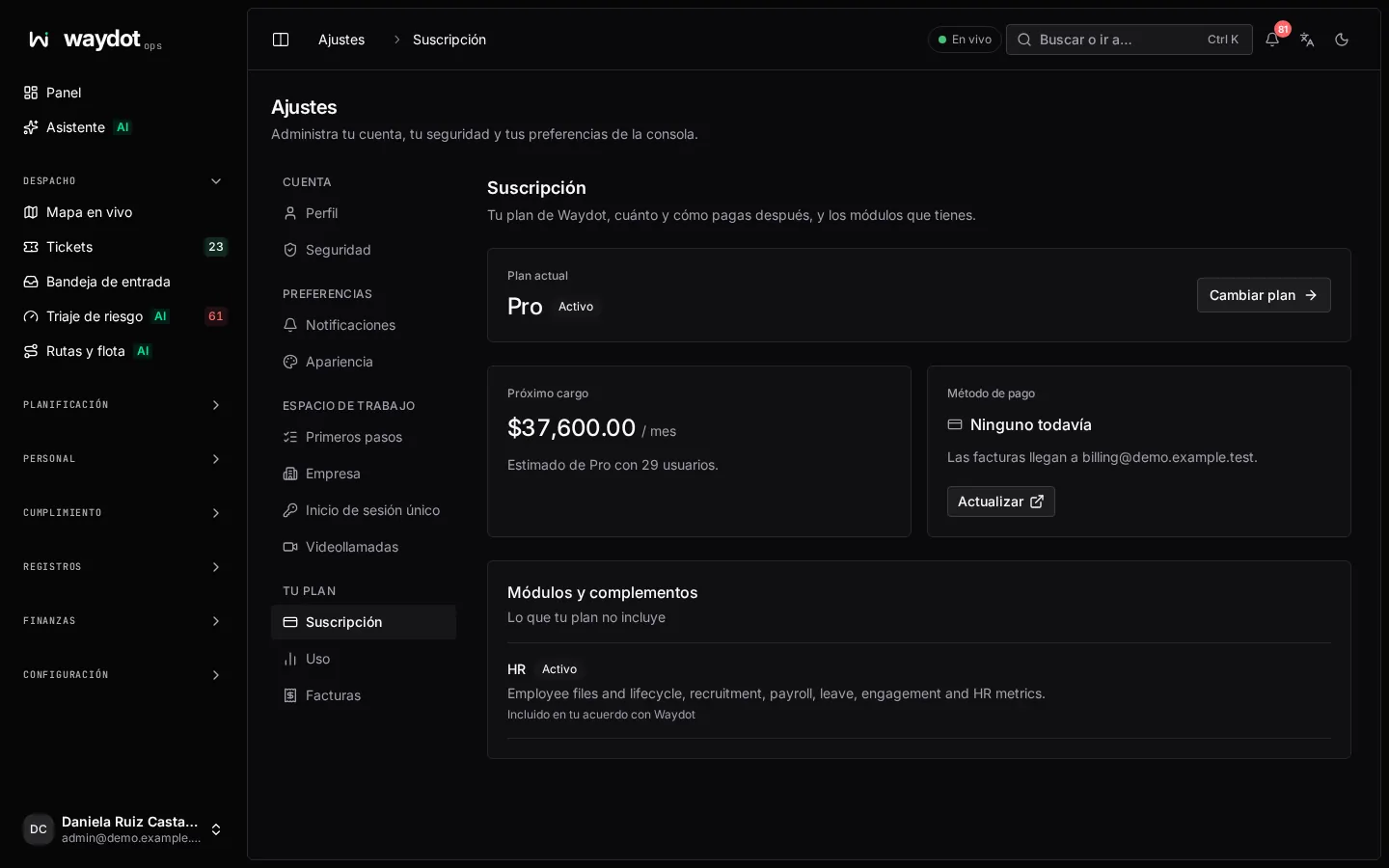
What it shows
| Block | What it says |
|---|---|
| Current plan | Your plan and the subscription state (see States). During the trial, when it ends. Change plan or Choose a plan opens the plan choice. |
| Next charge | How much will be charged and when, estimated from your active users (Estimate for Pro with 29 users). During the trial: Nothing to charge yet. |
| Payment method | The card on file, or OXXO or SPEI. Update opens Stripe's secure portal to change it. Invoices go to… shows the billing email. |
| Modules and add-ons | What your plan doesn't include: add-ons that are active, on trial or available to add. |
Choosing or changing plan
The plan choice opens full screen.
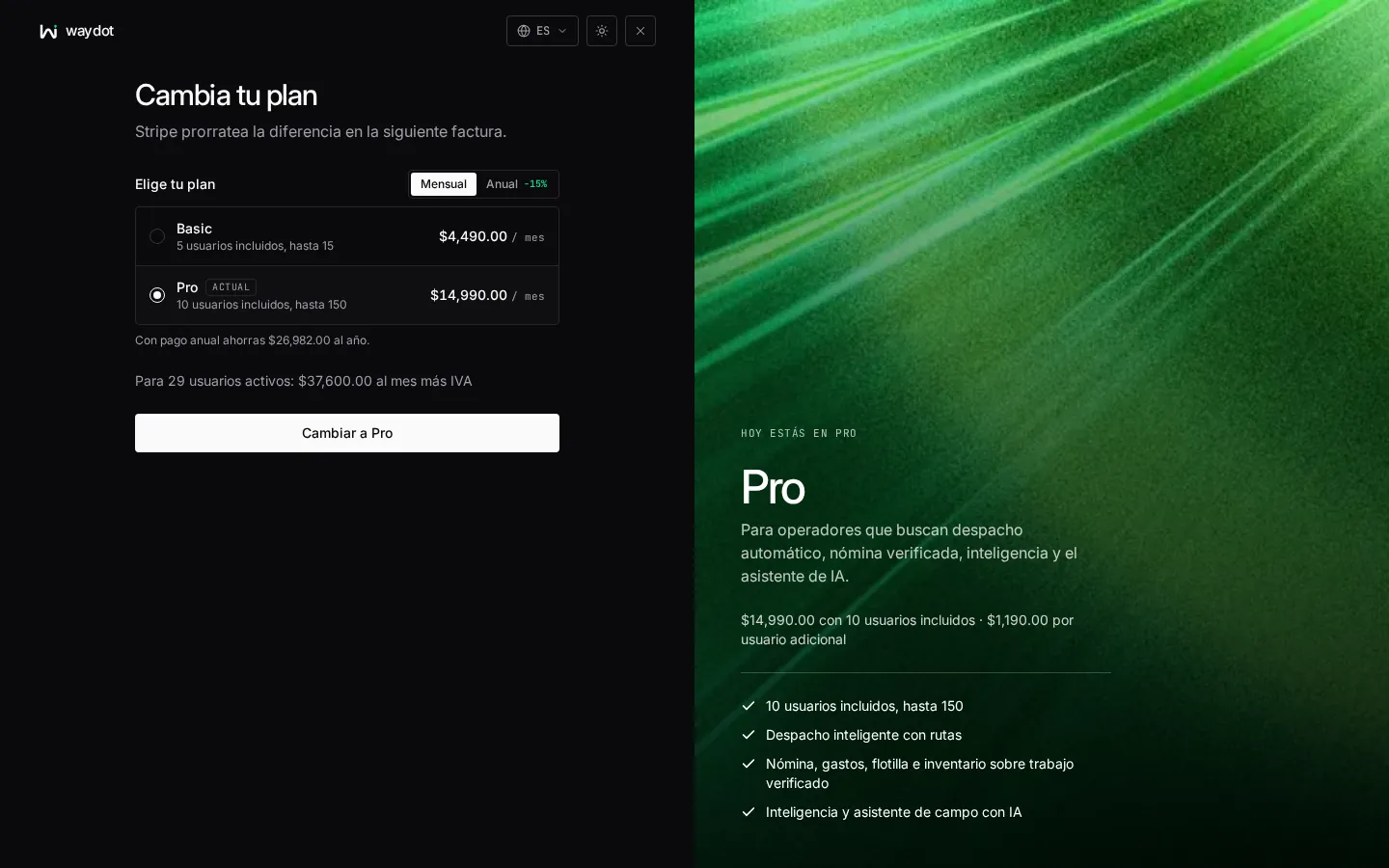
- Choose the frequency: Monthly or Yearly (discounted; it shows how much you save per year).
- Choose the plan. Each row says how many users it includes and allows, and the base price. The right panel summarizes what it includes.
- Enter how many Users you expect. It is only an estimate for the quote: each invoice follows your active users, never fewer than the plan minimum.
- Add add-ons if you need them (see below) and, optionally, assisted implementation: setup and data loading by the WAYDOT team, charged once with the first invoice (included with a yearly contract of 25 users or more).
- Choose How you pay:
- Card: entered in Stripe's secure checkout; it never reaches WAYDOT.
- OXXO or SPEI: each invoice arrives by email with an OXXO voucher and a SPEI account. Pesos only.
- If you have a code, use Have a promo code? and Apply. The discount is shown (for example 20% off for 3 months). A code may be valid only for a given currency.
- Check the total (Each month, before IVA) and choose Continue to checkout (or Change to … if you already have a subscription).
What happens next:
- During the trial nothing is charged before it ends; the first charge is made that day.
- Changing plan on an active subscription, Stripe prorates the difference on the next invoice. You'll see Now on ….
- If you cancel checkout you'll see that it was cancelled and nothing was charged.
- When you come back from checkout the subscription may take a moment to appear.
Enterprise is quoted: contact WAYDOT.
Billed users
A base price covers the users included in the plan; each additional user is charged separately. Every active person counts who has access to the workspace (console, Human resources or field app). Deactivated people aren't charged. Usage shows 29 of 10 included and how many extra users are billed.
To stop paying for someone, deactivate them in People.
Add-ons
Add-ons bring modules your plan doesn't include: Human resources, Payroll, Fleet and expenses, Inventory and assets, Health and safety, Quality, an extra WhatsApp number or a ServiceNow, Jira, Zendesk or similar integration.
| State | Meaning |
|---|---|
| Active | Charged with your subscription since the date shown. |
| On trial | Included in your trial until the date shown. Add it when choosing your plan to keep it. |
| Part of your agreement with Waydot | In your contract; not charged separately. |
| Available | Shows its price (per workspace, per user or per unit) and Add …. |
- Add … turns it on at once: its features are active right away. Some need another (Payroll needs Human resources; the extra WhatsApp number needs Client intake); if you don't have it, it is added too.
- Per-unit add-ons (such as WhatsApp numbers) have Add one more / Remove one.
- Cancel add-on turns its features off immediately for the whole workspace. The unused part of the period is credited on your next invoice. Data isn't deleted.
- If it says to choose a plan first, add the add-on when you subscribe.
Subscription states
| State | Meaning | What your team can do |
|---|---|---|
| Setting up | The workspace is being created. | Wait a few seconds. |
| On trial | Free trial. If it ends without a plan, the workspace becomes read-only. | Everything while it lasts. |
| Awaiting first payment | A plan was chosen and the first payment is missing (for example an unpaid OXXO voucher). | Read-only until the payment is confirmed. Complete payment. |
| Active | Subscription up to date. | Everything. |
| Payment overdue | A charge failed. There is a grace period (The grace period ends on…). | Everything during grace, with a notice at the top. After grace, read-only. |
| Suspended | WAYDOT suspended the workspace. | Only billing and the data export. Nothing else can be read. |
| Cancelled | The subscription ended. | Read and export data until the date it is deleted. |
| Closed | The workspace was closed and its data deleted. | Nothing. |
What keeps working while read-only
Even when the workspace is read-only (trial ended, first payment pending or grace expired), these keep working because safety and labor law don't wait for an invoice:
- the emergency (SOS) button and responding to alerts,
- clocking in and out,
- the field app downloading its offline copy,
- signing in, changing password and two-factor,
- billing and data export.
While read-only, trying to save shows a notice with the action to sort it out, and what you typed is kept. See Billing notices.