

English
Hazards and incidents
Agents report from the app the hazards they observe (an exposed cable, a slippery floor) and the incidents that happen (an injury, a near miss, damage). Here they're triaged, investigated and closed, and corrective actions come out of them.
Where it is: Compliance → Safety → Hazards & incidents. Who sees it: everyone the reports they're part of; with read the safety record across your territories, all in their territories. Reporting needs file JSAs, hazards, incidents and SOS alerts; reviewing and closing investigations, write safety checklists and close investigations. Plan: Health and safety (HSE) module.
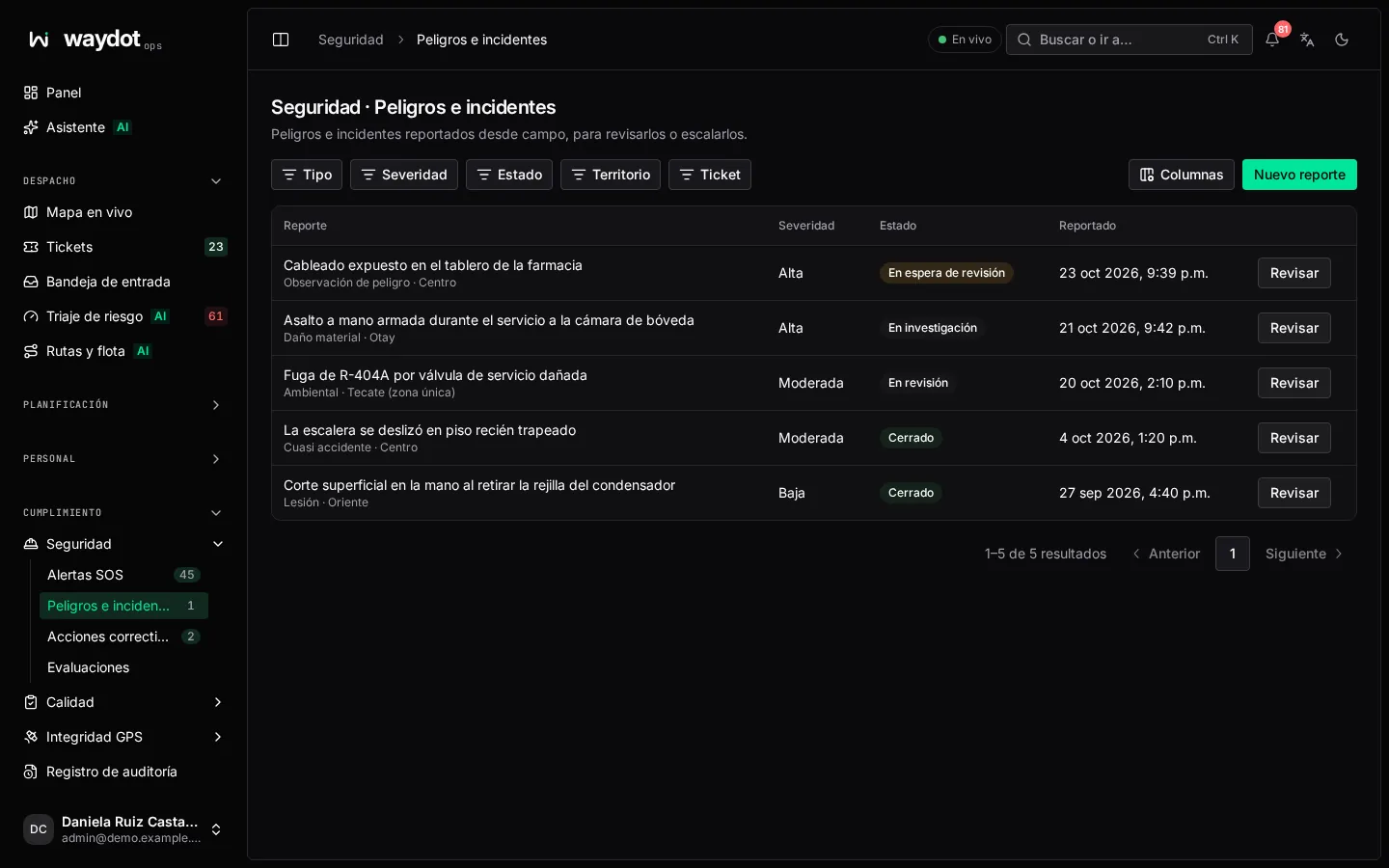
The list
Columns: type, summary, severity, site, who reported it, when, state and open actions. Filter by Type, Severity, state and territory. Review opens the decision.
Filing a report
New report (or from the field app):
| Field | What it is |
|---|---|
| Report type | Hazard, Near miss, Injury, Property damage or Environmental. |
| Severity | Low, Moderate, High or Critical. |
| Summary | One line. |
| What happened or was observed? | The description. |
| When it happened | Optional, in your zone's time. |
| Related ticket | Optional: the job it happened during. |
| Site | Optional: where. |
| Exact coordinates | Only if it wasn't at one of your sites (for example by a roadside). Latitude and Longitude; nothing is filled in for you. |
| Witnesses | Add witness: name, Contact and Statement. |
| Evidence | Add evidence reference with its Caption. Photos are attached from the app. |
File report: reviewers are notified as soon as you send it.
The report
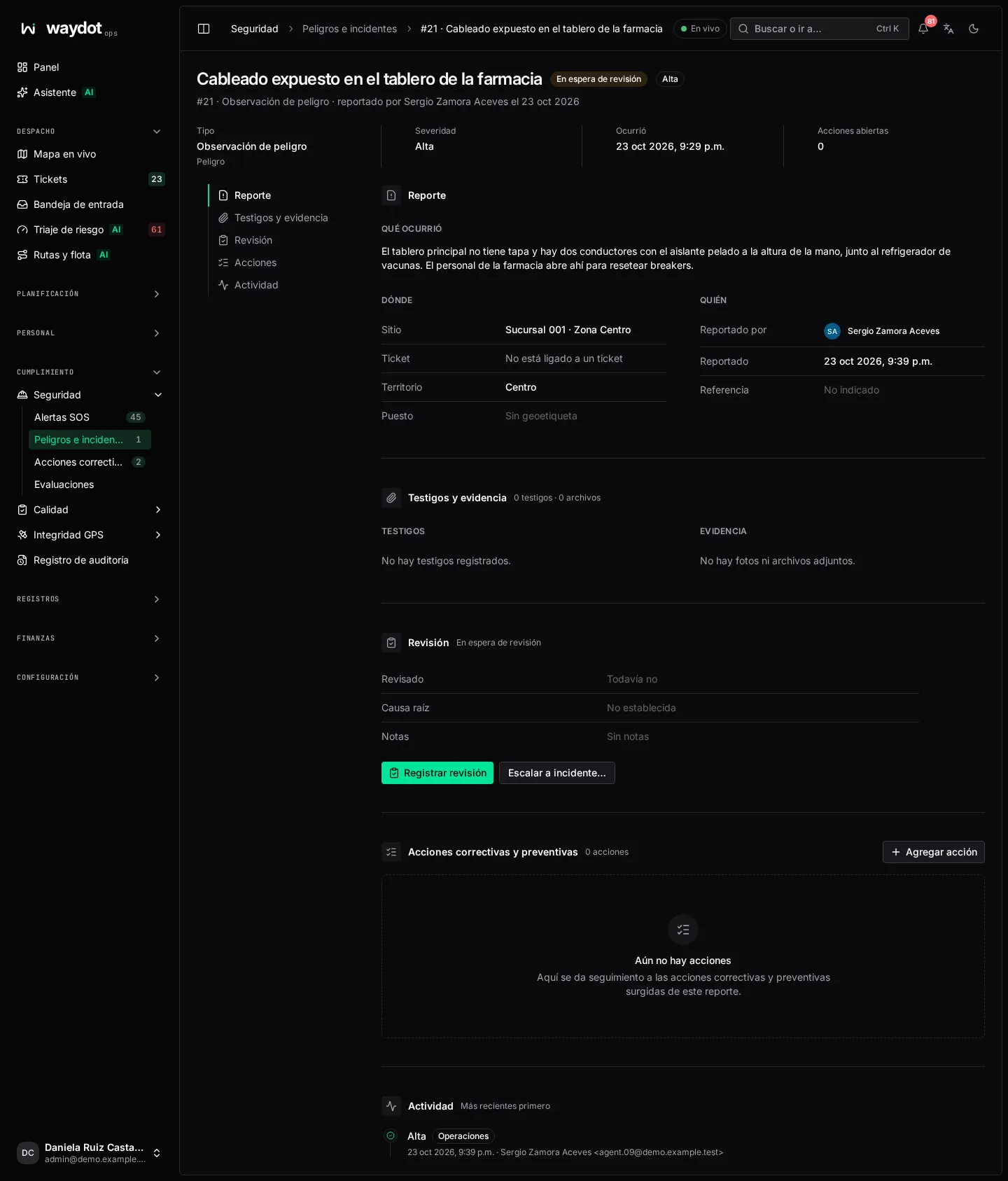
| Section | What it holds |
|---|---|
| What happened | Type, severity, summary and description. |
| Where | Site, ticket and coordinates (Not at a site, Not linked to a ticket, Not geo-tagged when not applicable). |
| Who | Reported by and when. |
| Witnesses & evidence | Statements, photos and files. If you can't see employees' personal data, witness statements aren't shown to you. |
| Review | Reviewed, Root cause and notes. |
| Corrective & preventive actions | Actions raised from the report, with Add action. |
| Recorded changes | The whole history. |
States and review
| State | Meaning |
|---|---|
| Reported | In the triage queue. |
| Under review | Someone is already on it. |
| Investigating | Needs looking into; closing it requires a root cause. |
| Closed | Nothing more to do. |
| Dismissed | It wasn't a real hazard or incident. |
Review opens Review the report with the Review outcome:
| Outcome | When | From |
|---|---|---|
| Start review | So others know it's being handled. | Reported |
| Open an investigation | For something that needs looking into. | Reported, Under review |
| Close the report | Nothing more to do; the report and its history remain. | Under review, Investigating (with Root cause) |
| Dismiss the report | It isn't real; explain why in the notes. | Reported, Under review |
Write the Review notes and choose Record review.
Escalating to an incident
A hazard that turned out more serious becomes an incident with Escalate to incident…: choose the Incident type, Incident severity and Reason for escalation. The change and your reason are recorded.
Adding actions
On the report, Add action creates a corrective or preventive action linked to it.