

English
Route trail
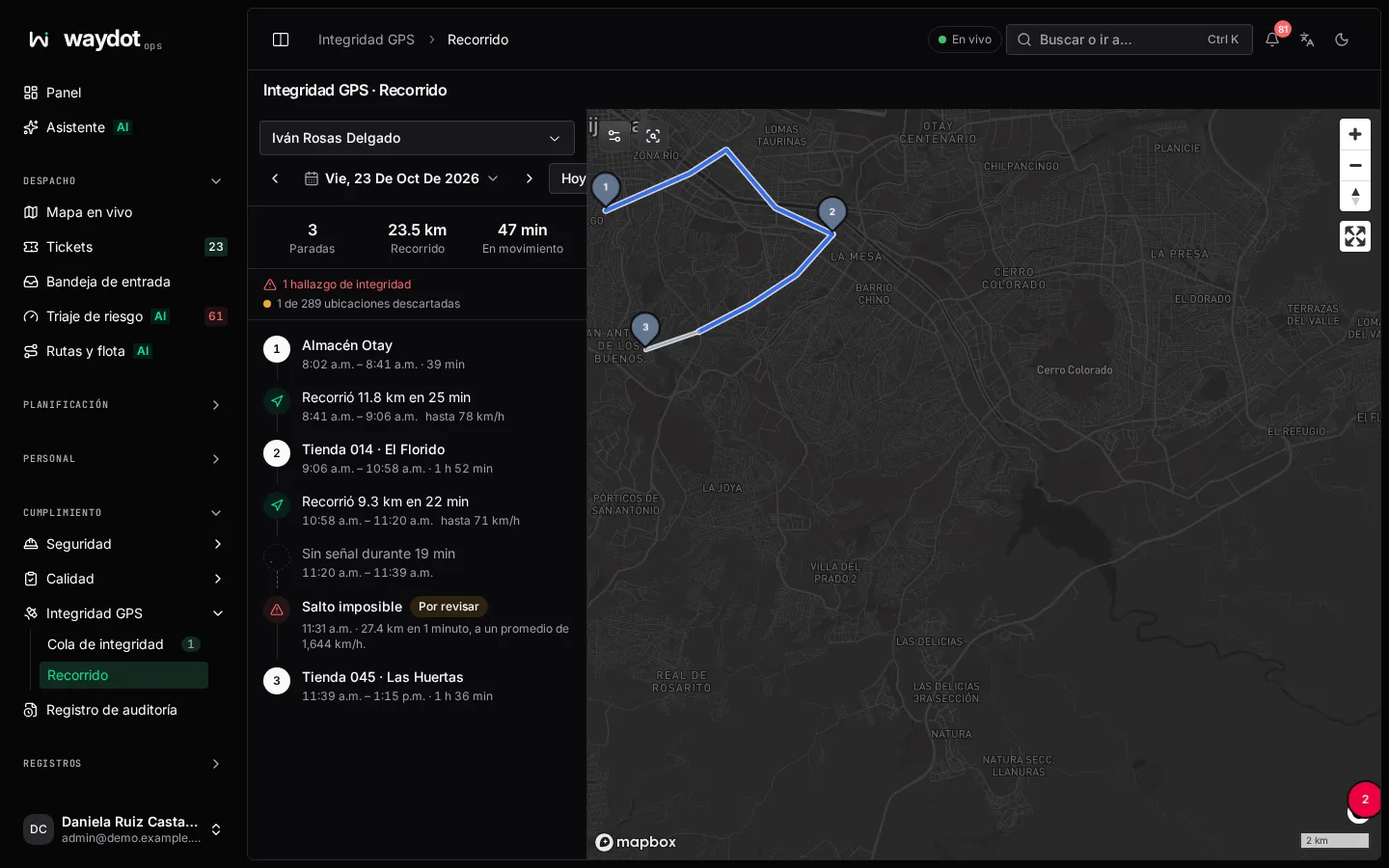
The route trail shows a person's day on the map from the locations their phone sent: where they stopped, where they passed and which locations were set aside.
Where it is: Compliance → GPS integrity → Route trail, or Show route trail from a finding or the location audit. Who sees it: everyone their own; with read location trails across your territories, those in their territories. Plan: Geolocation module.
How to use it
- Choose a person.
- Choose the Day (or Previous day / Next day). Days with a trail are marked on the calendar.
- The Day timeline lists:
- Stops: a place where they stood still (Store 014, or Unnamed place), from when to when, with Open site if it's one of your sites;
- Trips: Moved 12 km in 25 min, up to 80 km/h;
- No signal for 40 min when the phone sent nothing;
- integrity findings at their moment.
- Clicking an item centers it on the map.
The top summarizes: N fixes recorded, M of N fixes set aside, K integrity findings and the latest location's time.
Set-aside fixes
Mocked or low-confidence readings (less accurate than the threshold) show on the Set-aside fixes layer, but never form a stop or a trip.
How long it's kept
The raw trail is kept for 7 years by default (configurable). Geofence visits and findings are always kept.