

English
Dashboard and shift
Panel (dashboard)
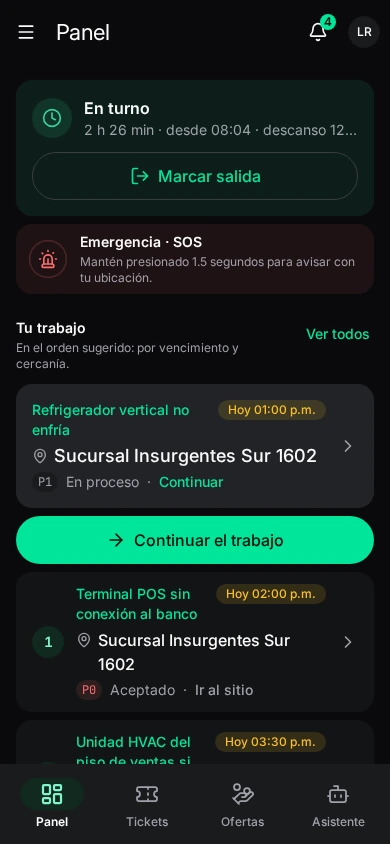
Tu trabajo de hoy, y cómo va el mes (today's work, and how the month is going).
- Tu turno (your shift): whether you're on shift or Fuera de turno (off shift), and the button to clock. Tap for the detail.
- Emergencia · SOS: press and hold to send the alert. See Safety.
- Tu trabajo (your work): assigned tickets in the suggested order: by deadline and proximity, each with its deadline and next step (Aceptar accept, Ir al sitio go to site, Marcar llegada mark arrival, Iniciar trabajo start work, Continuar continue). Sin trabajo pendiente (no pending work) if there's none; Ver ofertas (see offers).
- Pendientes: what you need to attend to (audits, defects, safety actions).
- Últimos 30 días (last 30 days): Tickets, Pendientes (unresolved), Sin evidencia (without a photo yet) and Sucursales (sites served), with Últimos tickets.
Turno (shift)
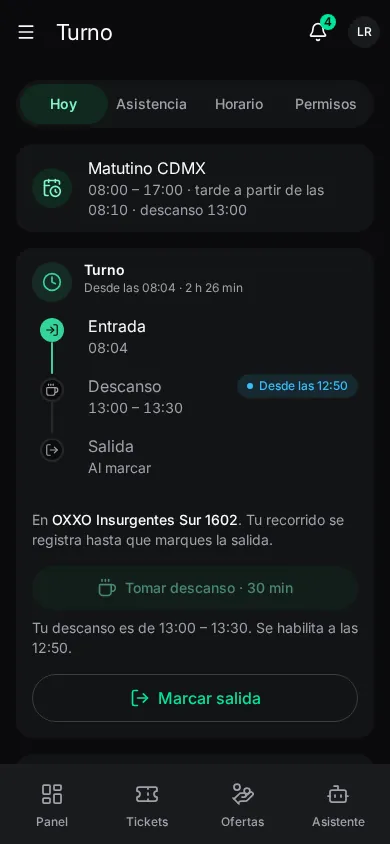
Turno: clock-in and out, your hours, your schedule and your leave. It has four tabs: Hoy (today: your shift and clocking), Asistencia (your attendance log), Horario (schedule) and Permisos (leave).
Clocking in and out
Clock in when you arrive. The app takes your location and compares it with the authorized areas (work geofences, or your home if you telework):
| Indicator | What it means |
|---|---|
| Dentro del área autorizada | Inside the authorized area: the clock-in is verified. |
| Casa (teletrabajo) | Your registered home counts as a workplace. |
| Fuera · se avisará | Outside: accepted, but unverified and dispatch is told. |
| Ubicación imprecisa / Ubicación simulada | The reading isn't reliable (imprecise / mocked). Wait for it to settle (Estabilizando ubicación…). |
| Sin área cercana | No authorized area nearby. |
While your shift is open your trail is recorded (Mi recorrido de hoy — my trail today); clocking out records where you are and stops recording.
Odometer at clock-in: if your company asks, when clocking in and out you type your vehicle's Odómetro (the number the dashboard shows now).
Break
If your shift has a legal break, it's planned before the shift. At the time: Tomar descanso de 30 minutos (take a 30-minute break). During the break there's no trail or alerts, and you're not assigned tickets; it ends by itself, you don't need to clock anything. It's taken once per shift. If the time passed: Pasó la hora de tu descanso. Habla con tu coordinador (talk to your coordinator).
Your schedule
Tu turno de hoy (today's shift) and the two-week schedule, with your Descansos (rest days) and Cambiado (changed) shifts.
Attendance log
Each day you clocked in and out, by fortnight: in, out, Trabajado (worked), Retraso (late), Tiempo extra (overtime) and whether the location was verified.
Solicitar corrección (request correction) on a day: type the correct Entrada and Salida times and Qué pasó (what happened: Olvidé marcar la salida al terminar en la sucursal…), then Enviar a revisión. A manager reviews it before the hours change. See Attendance corrections.
Leave
Your Vacaciones balance and your requests. Solicitar permiso (request leave):
| Field | What it is |
|---|---|
| Tipo | Vacation, sick, unpaid, compassionate. |
| Desde / Hasta | From / to. |
| Motivo | Reason (Cita médica, trámite, viaje familiar…). |
| Other fields | If the type needs proof, it's attached here. |
Enviar solicitud: dispatch reviews it and you'll see the answer here and in your notifications. You can Cancelar a pending one. See Leave.