

English
Tickets in the app
Where it is: Tickets in the bottom bar.
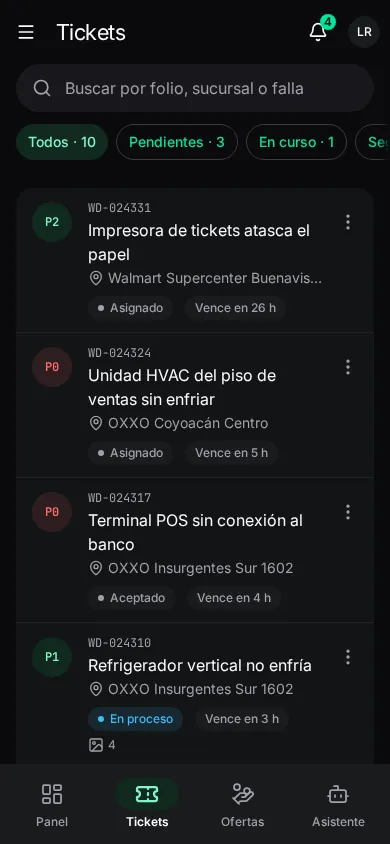
The list
Your assigned tickets (or, for a dispatcher, those in their scope), each with its folio, site, fault, priority, state and deadline. Search by folio, client number, site or fault; filter by Estado (Sin asignar unassigned, Asignado, Aceptado, En camino on the way, En sitio on site, En proceso in progress, Requiere seguimiento follow-up needed, Resuelto, Cancelado) and by date.
Your tickets download the first time the phone has signal and are then available offline.
Raising a ticket from the field
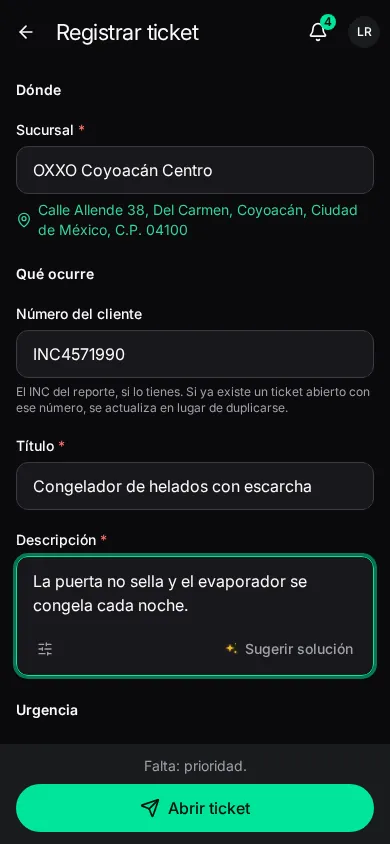
When a client asks for something on site that has no ticket. Registrar ticket (or Nuevo ticket):
| Field | What it is |
|---|---|
| Sucursal | Site: pick from the list. |
| Número del cliente | The client's INC number, if you have it. If an open ticket with that number already exists, it's updated instead of duplicated. |
| Título | What's failing. |
| Descripción | What's happening and since when. |
| Prioridad | One of the levels of that site's contract; P0 is the most urgent. |
| Minutos estimados | Optional, 5 to 1440. |
Abrir ticket: it reaches dispatch on sending; without signal, as soon as there is some. Without permission (No puedes abrir tickets), ask dispatch to raise it. If it's a hazard, file a safety report instead.
Correcting a ticket
On a ticket you raised, Corregir datos (correct details): Número del cliente, Título, Descripción and Prioridad. Guardar corrección. A closed ticket can't be corrected; if it's someone else's, tell dispatch with a note.