

English
Vehicle in the app
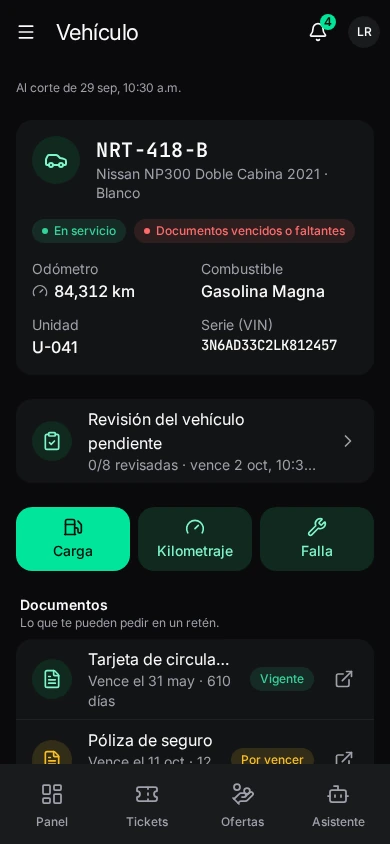
Where it is: Vehículo. The unit assigned to you, its papers and its service.Plan: Fleet module.
With no vehicle assigned: when fleet hands you a unit, you'll see its papers, service and fill-ups here.
What it shows
- Unidad: plate, model, Serie (VIN), Odómetro, Combustible (fuel) and whether it's roadworthy.
- Documentos: what you can be asked for at a checkpoint. Each with its expiry (Vence el 3 nov · 9 días, Venció el…, No está en el expediente).
- Mantenimiento: scheduled services and when they're due.
- Cargas de combustible: your fill-ups, with their state.
With a check pending: Revisión del vehículo pendiente (see Audits).
Logging a fill-up
Carga → Registrar carga de combustible:
| Field | What it is |
|---|---|
| Litros and Importe | Liters and amount. |
| Odómetro | Dashboard km. If lower than the last, you're warned: check before sending. |
| Forma de pago | Company card, voucher, paid by you or advance. |
| Combustible, Fecha y hora, Estación | Fuel, date and time, station. |
| Ticket | The pump ticket photo. If there's none, ¿Por qué no hay ticket? (La estación no imprimió, se mojó…). |
Registrar carga: fleet reviews it against the ticket; you'll see the result on your vehicle. Agregar ticket attaches the receipt later. Needs a connection. See Fuel fill-ups.
Logging the odometer
Kilometraje → the Odómetro (what the dashboard shows now) and a note. Guardar kilometraje. Fill-ups, services and handovers already log their own.
Reporting a fault
Falla → Reportar una falla: ¿Qué tipo de falla?, Qué pasa (when it started, what you hear or see, whether it can still be driven…), the Odómetro (optional) and Fotos. Enviar reporte: fleet turns it into a shop work order and tells you when to take it in. See Fleet work orders.