

English
Building forms
WAYDOT uses the same editor for everything filled in as a form:
- Form templates and task lists: what the technician captures on site.
- Safety checklists: the safety analysis before starting.
- Quality rules: the rubric an inspection is graded with.
- Custom fields: your own data on tickets, employees, assets, vehicles, clients and leave.
This page explains the editor once; each screen's page only explains what differs.
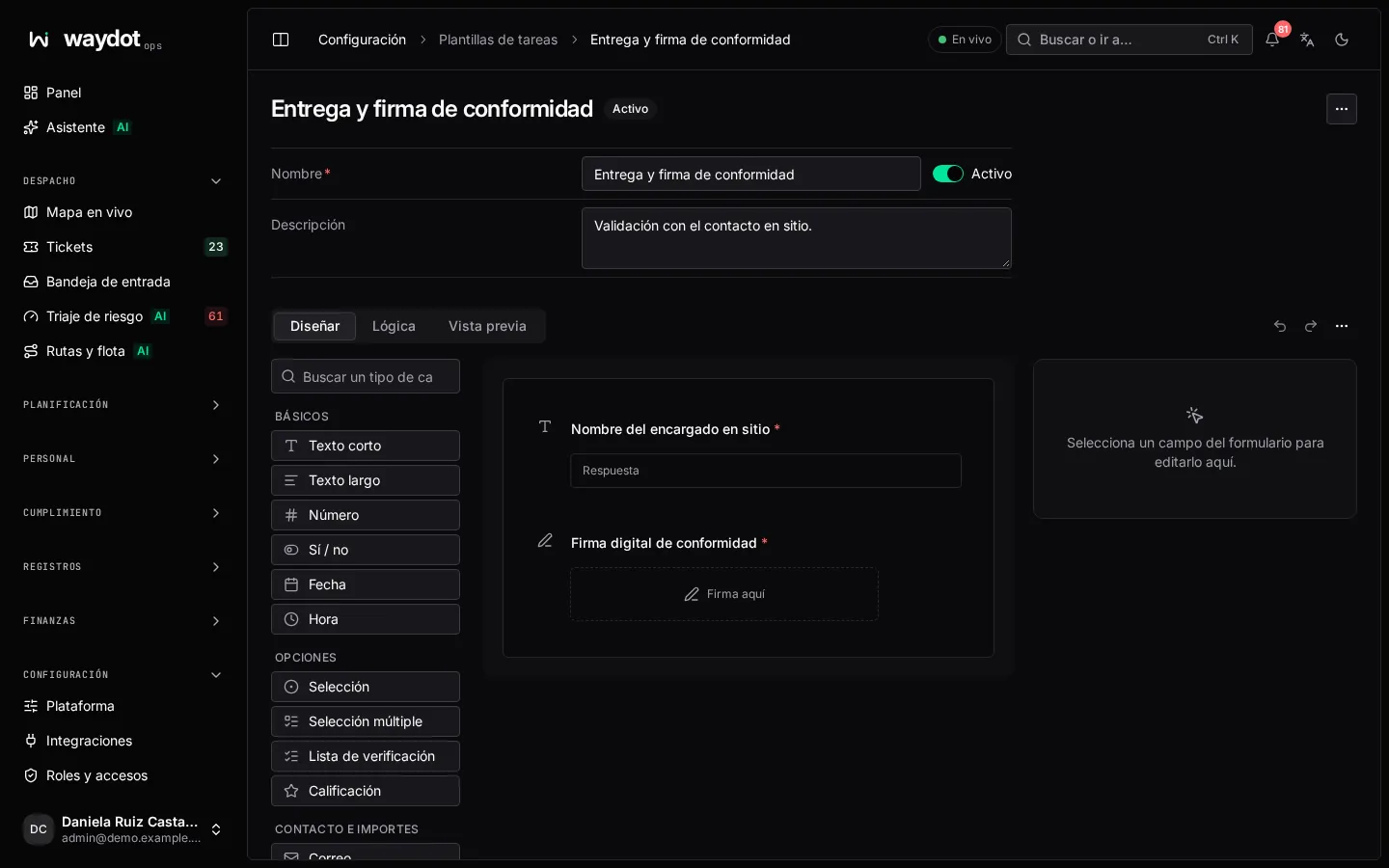
The three tabs
| Tab | What for |
|---|---|
| Build | Adding, ordering and configuring questions. |
| Logic | Deciding when each question is asked based on earlier answers. |
| Preview | Answering the form as the technician will see it in the app, to test the logic. Nothing is saved. Clear the preview answers starts again. |
On wide screens the editor shows three columns: the field types on the left, the form in the middle and the question settings on the right (or the Form overview when none is open: how many questions, how many required, how many with logic).
Adding questions
- Drag a field type from the left onto the form, or click it to add it at the end.
- On narrow screens use Add at the top.
- Ready-made blocks: groups of questions almost every field form needs, already set up (see below).
- Copy from another form…: brings questions from another form in the workspace (task form, safety checklist or quality rubric) or pastes them as JSON. Their keys and conditions adjust themselves.
A form holds up to 50 questions.
Field types
| Group | Type | What it asks for |
|---|---|---|
| Basic | Short text | A short written answer. |
| Long text | A written answer over several lines. | |
| Number | A number, such as a reading or a count. | |
| Yes / no | Yes or no. | |
| Date | A calendar day. | |
| Time | A time of day. | |
| Choice | Selection | One answer from a list you write (2 to 20 choices). |
| Multi-select | Several answers from that list. | |
| Checklist | Items the technician ticks one by one (1 to 30). | |
| Rating | 1 to 5, or up to 10 (choose the Scale). | |
| Contact and amounts | An email address. | |
| Phone | A phone number. | |
| Amount | An amount of money, up to two decimals. | |
| Capture | Photo | Photos taken with the phone camera (up to 10). |
| Signature | A signature drawn on screen, with the signer's name. | |
| Barcode scan | A code read with the camera (or typed). | |
| GPS location | Where the phone is when answering. | |
| File | An attached document. | |
| Layout | Section | A heading that starts a part of the form. Not answered. |
| Instructions | Text for the technician to read. Not answered. | |
| Repeated rows | Rows with the same questions, such as materials and quantities: 1 to 10 columns and a Most rows limit. |
The type can't change later
A saved question keeps its type. To ask for something else, add a new question.
Configuring a question
Click a question to open its settings:
| Setting | What it does |
|---|---|
| Text | The question as the technician reads it. |
| Help text | A clarification shown under the question. |
| Required | The technician can't finish the form without answering it. Sections and instructions can't be required. |
| Choices / Items to tick | For selections and checklists. Edit as text lets you paste a list, one per line. |
| Safe answer | On yes/no or selection questions in safety checklists: the answer that lets work continue. Any other answer stops the work until it is resolved. |
| Ask this question | Always or Only when… (see Logic). |
| Limits on the answer | See below. |
| Advanced → Key | How the answer is stored (lowercase letters, numbers and underscores). It is generated from the question; don't change it once the form is in use, because reports and integrations rely on it. |
Limits on the answer
| Type | Available limits |
|---|---|
| Text, barcode, signature | Fewest characters, Most characters and a Pattern. |
| Number | Lowest and Highest. |
| Multi-select | Choose At least and At most. |
| Photo | At least and At most photos, up to 10. |
| Date | From and To. |
The Pattern is a regular expression. Common patterns offers: Digits only, Phone number, Email address, Upper-case code, License plate and RFC. With Try an answer type an example and see whether it is Accepted or Refused.
Logic
A condition changes a question depending on the answer to an earlier one. In the Logic tab (or Ask only when… on the question) choose:
- When the answer to — the question it depends on.
- The comparison and the value.
- Then — what to do: Show this question, Hide this question, Make this question required or Lock this question.
Comparisons available by the type of the question you depend on:
| Type | Comparisons |
|---|---|
| Number, amount, rating | is, is not, is greater than, is at least, is less than, is at most |
| Text, barcode, email, phone | is, is not, contains, is one of, is not one of |
| Selection | is, is not, is one of, is not one of |
| Yes/no, date, time | is, is not |
A question holds up to 10 conditions. Conditions with the same action apply when any of them is met. A question can't depend on itself, and checklists and multi-selects can't be the source of a condition.
On the form, a question with logic shows Conditional and the sentence Only if “…” is ….
Ready-made blocks
| Block | What it adds |
|---|---|
| Arrival on site | Location on arrival and a photo of the site. |
| Protective equipment | A list of the equipment worn: helmet, glasses, gloves, boots, vest. |
| Hazard found | Did you find any hazard? and, if so, a description and photo. |
| Meter reading | The reading and a photo of the meter. |
| Work outcome | Finished / Partly finished / Not finished and, if not finished, why. |
| Customer sign-off | The customer's name and signature. |
| Materials used | Rows of material and quantity. |
Working with several questions
- Select questions turns on multi-selection: tick several and make them Required or Optional, Move to the top, Move to the bottom, Duplicate or Delete.
- Find a question filters a long form.
- Copy as JSON copies the questions to paste into another form.
- Undo and Redo (Ctrl Z). Alt ↑ / Alt ↓ move the open question.
Problems before saving
The Problems tab lists what prevents saving, for example Write the question, Add at least two choices, Two choices say the same thing, Another question has this key or Its condition points at a question that no longer exists. Each has Fix, which takes you to the question. When there's nothing: Nothing to fix. The form is ready to save.