

English
Visit plans
A visit plan books visits to one or several of a client's sites: once on a date, once before a deadline, or on a repeating pattern. The client's contract sets each ticket's deadlines from the urgency you choose.
Where it is: Planning → Scheduled visits → Plans. Who sees it: people allowed to read scheduled visits; creating and changing plans needs manage scheduled visits. Plan: included from Basic.
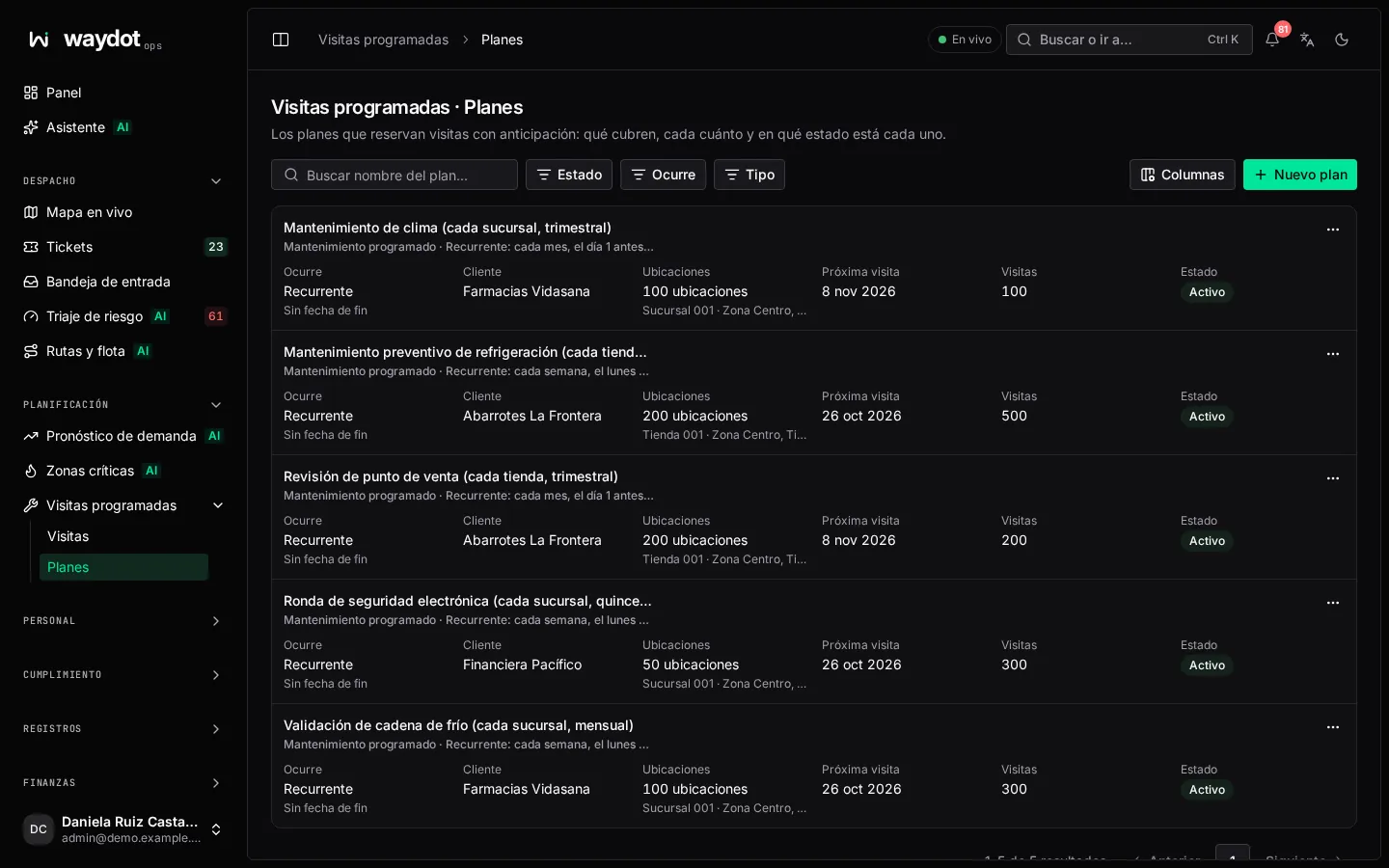
The plan list
Each plan shows its name, type, client, how many locations it covers, its rule (Every month, the first Monday…), until when (No end date for an open contract), its next visit and its state: Active, Paused or Ended (in the state filter, active plans are called Running), with On track, Due soon or Overdue.
Filter by state, Type and how it occurs (On a date, By a deadline, recurring). New plan opens the form.
Creating a plan
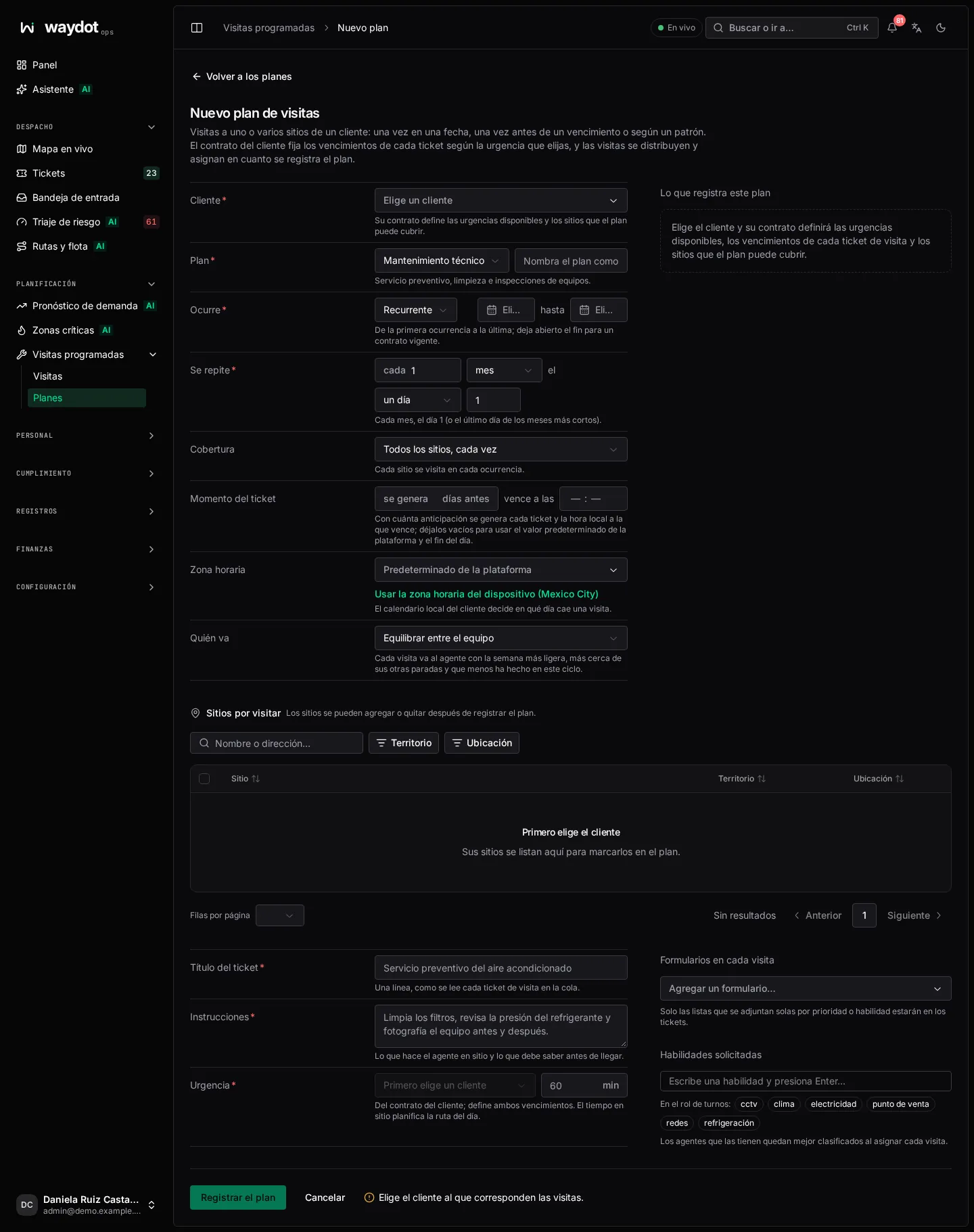
Client and type
| Field | Meaning |
|---|---|
| Client | Who the visits are for. Its contract defines the available urgencies and the sites the plan can cover. |
| Kind of visit | Technical maintenance (preventive service, cleaning, inspections), Other visit (installations, moves, refits, meter readings, audits) or Equipment renewal (the units listed per site are named on each visit's ticket for the technician to collect). |
| Name | As it will appear in the list and as a badge on every ticket. |
When it happens
| Option | How it works | Fields |
|---|---|---|
| On a date | Each location is visited on a given day. | The day, and optionally the preferred time. |
| By a deadline | Visits are spread over the working days up to the deadline; every ticket is due on it. | Visit window: first day a visit can be booked and the deadline. |
| Recurring | A pattern that keeps raising visits until it ends. | First occurrence, Repeats and Last occurrence, optional (empty for an ongoing contract). |
Repeats builds the rule:
- every N days, weeks (choosing the weekday), months or years;
- for months and years, Falls on a day (the Day of the month; in shorter months, the last day) or a weekday (Which week: First, Second, Third, Fourth or Last, and the Weekday).
Examples: Every Monday, Every other Tuesday, Every 3 months, the first Monday, Every year, on the 15th.
The client's local calendar decides which day a visit falls on.
Coverage (recurring)
| Option | What it does |
|---|---|
| Every site, each time | Each occurrence visits all of the plan's sites. |
| The sites take turns | Sites are spread over N occurrences: each site is visited once per cycle. For example 12 on a monthly rule visits each site once a year. Neighboring sites share a turn, so an agent's month stays in one area. |
Ticket timing
| Field | Meaning |
|---|---|
| raised N days ahead | How far ahead of the visit its ticket is raised. Empty uses the platform default. |
| due by | The local time the ticket is due on the visit day. Empty: end of day. |
If the lead time is equal to or longer than the interval between visits to the same site, you're warned that tickets for the same site will overlap.
Who goes
| Option | What it does |
|---|---|
| Balance across the team | Each visit goes to the agent with the lightest week, nearest their other stops and who has done fewest this cycle. |
| An agent | All visits go to the chosen agent, unless a site names its own. |
| Ops decides | Visits are booked without an agent; each is assigned by hand. |
Each visit's ticket
| Field | Meaning |
|---|---|
| Ticket title | One line, as each visit ticket reads in the queue. E.g. Preventive service of the air-conditioning. |
| Instructions | What the agent does on site and what they should know before arriving. Required. |
| Urgency | From the client's contract; sets both deadlines. |
| Minutes on site | How long the visit takes; used to plan the day's route. |
| Forms on every visit | Task lists pinned to every ticket. With none chosen, only lists that attach themselves by priority or skill are attached. |
| Skills asked for | Agents holding them rank highest when each visit is assigned. On the roster: shows who has them. |
Sites to visit
The table lists the client's sites. Search by name or address, filter by On the map / No coordinates (without coordinates distance can't be measured when assigning) and tick the sites, or Visit all N on the page. In the agent column, Names its own gives a site its own agent every time.
Units to remove (renewal)
For an Equipment renewal plan, tick the units installed at the ticked sites that the visit collects (search by number, serial or barcode), or Load the client’s sheet: a CSV or Excel file with one unit per row (serial, number or barcode, and the store when known). The sheet is matched against installed units; rows that can't be located stay off the plan for you to correct or tick by hand.
What this plan books
The right panel summarizes live: The 24 sites are visited every month, the first Monday, from 3 November, the coverage, who goes, the urgency with Respond within and Resolve within, and the Next occurrences. If something is missing, it says what (Tick at least one site to visit).
Book the plan creates it: Plan created; its visits are laid out and staffed.
The plan page
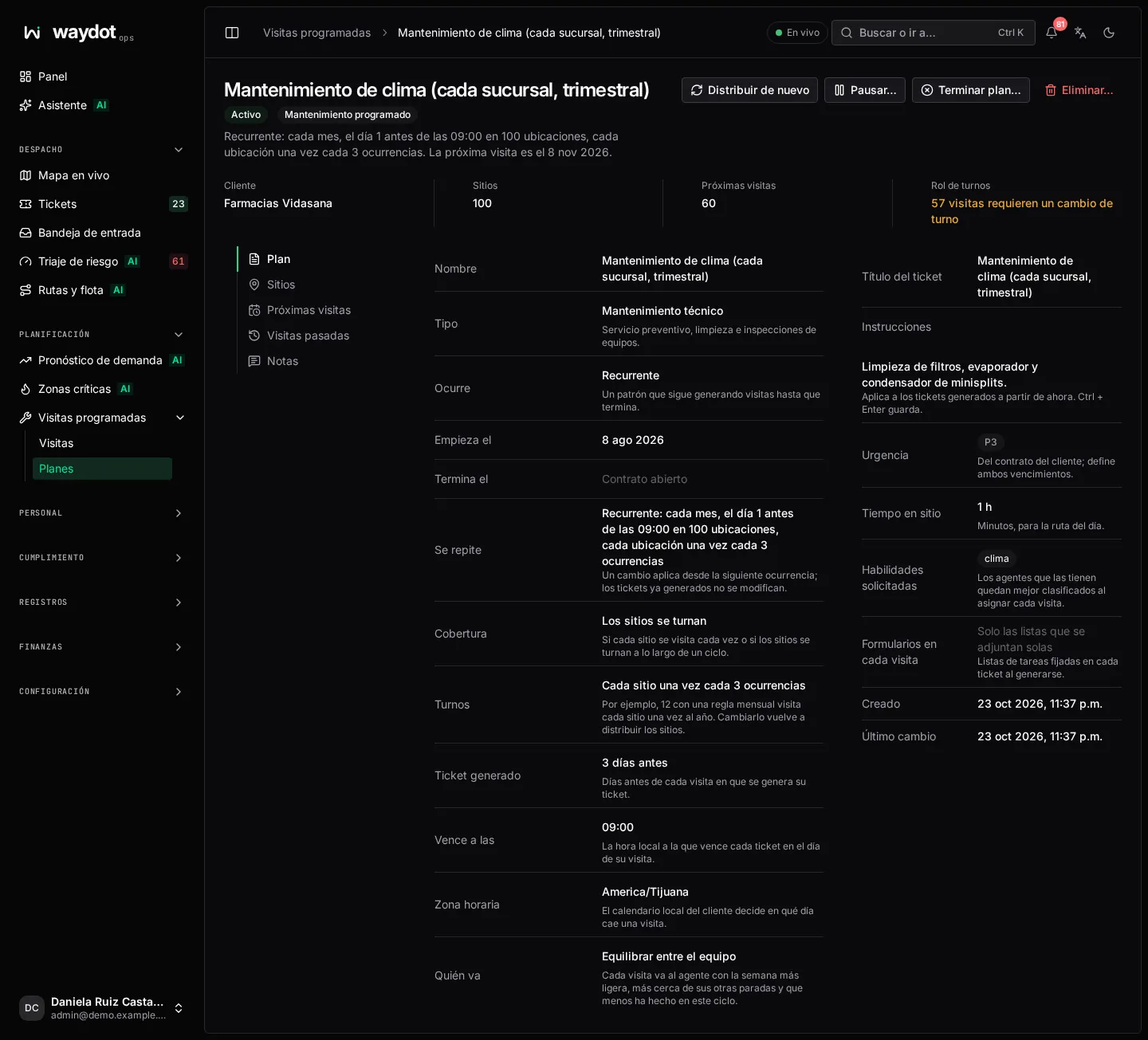
It shows the state (Running. The next visit is on…, Paused from…, Ended on…), Coming visits, Past visits, the Roster (All covered or N visits need a shift change) and every setting. Each setting is edited in place:
- A change applies from the next occurrence; tickets already raised aren't changed.
- Changing Turns (coverage) lays the sites out again.
- Changing instructions applies to tickets raised from now on.
- Time zone: the client's decides which day each visit falls on; if the plan doesn't state one, the platform default is used.
The Notes section keeps the team's conversation about the plan.
Actions
| Action | What it does |
|---|---|
| Lay out again | Re-plans the coming visits from the rule and the sites. What Ops pinned by hand is kept. Reports N laid out, M dropped, K assigned. |
| Pause… | From the Takes effect on date (empty = today), no tickets are raised. Skipped visits aren't made up; tickets already raised don't change. Resume turns it back on. |
| End plan… | Stops raising tickets for good. An ended plan can't be resumed or changed; if the contract comes back, create a new plan. It stays in the history. |
| Delete… | Only if it never raised a ticket: it is deleted completely with its planned visits. A plan with raised tickets is ended instead. |
| Move the visit | In Coming visits, Move changes one visit's day without affecting the rest. |
| Assign | On a visit without an agent. |
Plan sites
Add or remove opens Plan sites: tick the sites it visits. Changing them lays the coming visits out again; visits already raised keep their site. At least one must remain.
Units (renewal)
The Units section lists each unit with Where now and its state: Still installed, Collected, Missing or Scrapped, and a summary 24 listed · 10 collected · 13 still installed · 1 missing.
- Add or remove… changes the units; they are named on tickets raised from now on.
- Report missing opens an investigation for a missing device for each unit still recorded at its site that wasn't found. Custody doesn't change here.