

English
Payroll
Payroll is calculated per period (Period 21) of each pay group: Weekly, Fortnightly or Monthly. It takes from WAYDOT what's already recorded (validated attendance, overtime, absences, leave, incapacities, approved expenses, loans, incentives) and works out each payslip with the tax tables in force.
Where it is: Finance → Payroll → Periods. Who sees it: with read payroll periods and payslips in your scope, the periods. Calculating, capturing, paying and closing need open, collect, calculate and export payroll periods; approving, approve a calculated payroll period, never one you calculated. Plan: Payroll and compensation add-on.

The periods list
Each period with its Pay group, Type (Regular, off-cycle or Final settlement), Employees, Earnings, Deductions, Net pay, Employer cost, Paid on, Exceptions and state. Export CSV.
Each pay group's period opens by itself on its first day. Open a period is for other dates or an off-cycle payment.
Opening a period
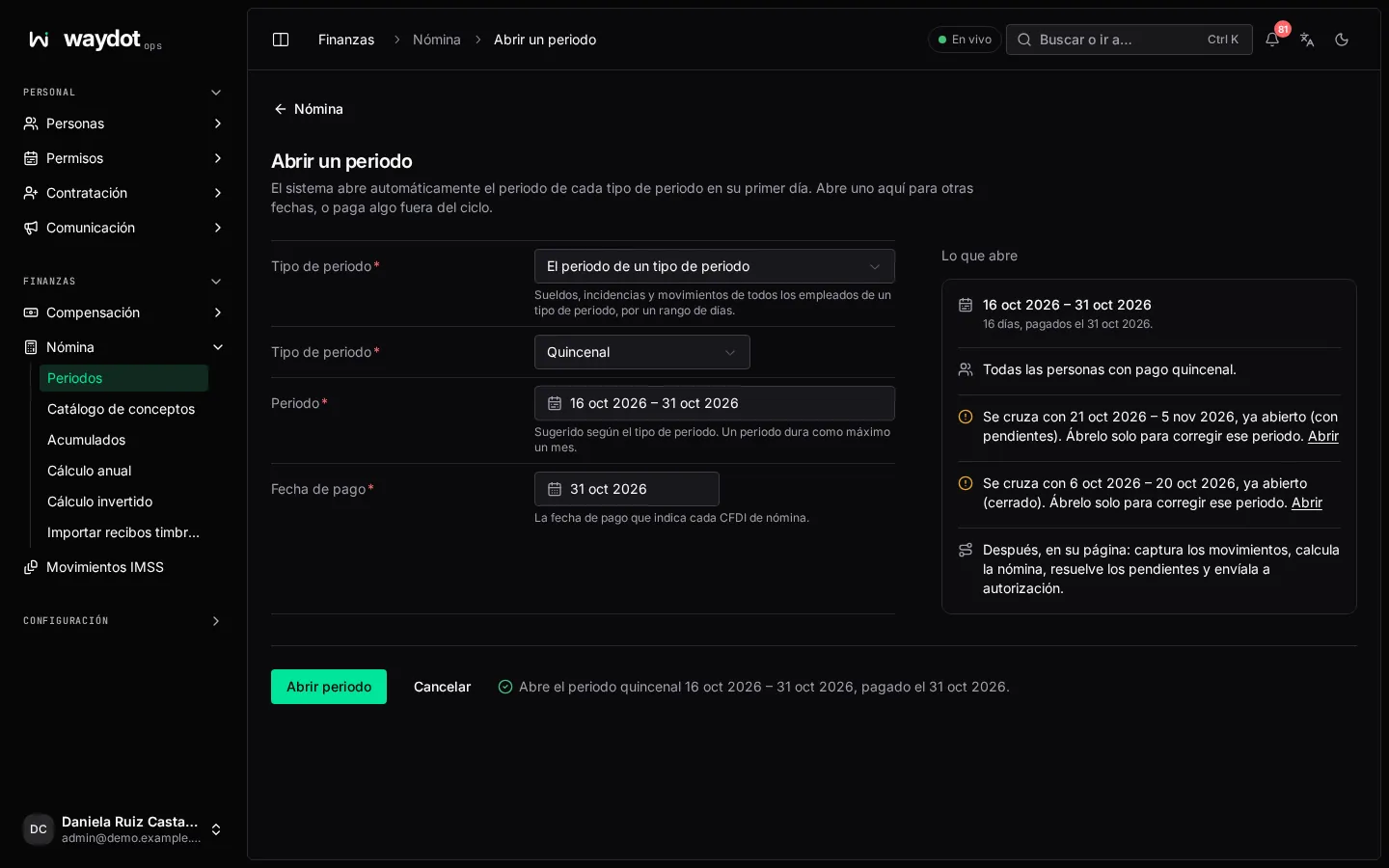
| Field | What it is |
|---|---|
| Type | A pay group's period (wages, attendance and movements of everyone in that group) or An off-cycle payment (a pay day outside the regular cycle, for people of any pay group). |
| Period | The days it covers (suggested by the group). A period lasts at most a month. You're warned if it overlaps one already open. |
| Paid on | The date each payroll CFDI states. Not before the period starts. |
| What it pays | For an off-cycle payment: Year-end bonus 2026, a bonus, a correction. |
What this opens sums it up (15 days, paid on 15 Nov. Follows 16–31 Oct). Open period.
A period's steps
Where this period stands: Calculate → Review → Approve → Pay → Confirm → Close. The next step is always stated at the top.
1. Capturing movements
Movements tab. New movement (or Capture movements):
| Field | What it is |
|---|---|
| Person | Someone this period pays. |
| Pays or takes | Pays (earning) or Takes (deduction). |
| Line | Bonus, Commission, Correction, Other earning, Damages, Other deduction… |
| Amount | |
| ISR is charged on it | Whether it's taxable. |
| Corrects | For a correction: the frozen period that paid them. Paying the correction marks it as adjusted. |
| Why | Two hours of overtime on the 2nd, approved late. |
Add and calculate: it's added with its reason for the approver, and the period is calculated again right away.
Movements sheet: movements by person and line in a grid; paste a block copied from Excel into any cell to fill to its right and below. Absences, overtime, incapacities and vacation aren't captured: they come from attendance, leave and the employee file.
2. Calculating
Calculate payroll takes attendance and leave, and the movements, and works out each payslip. Calculate again after any change.
3. Pending
Pending lists what stops paying correctly, with its owner (HR or Financials) and state (To review, Decided, Excluded):
| Pending item | What it means |
|---|---|
| Days not validated or disputed | Only validated hours are paid. |
| Expense awaiting a decision | Paid in the first period after it's approved. |
| No hours or leave | Nothing was recorded for that person in the period. |
| No approved pay | They're in no pay group. See Compensation. |
| Incomplete file | RFC, CURP, postal code… missing. Without it the CFDI can't be stamped. |
| Negative net | Deductions exceed their pay. |
| No tax tables | None in force on that date; it can't be calculated. |
| Last year's tables | It's calculated with old figures. |
| No hire date | Year-end bonus, vacation and service can't be counted. |
| Late correction | Days from a frozen period changed afterwards; add a correction or go ahead without it. |
| Sent back | The approver returned it with a note. |
Open goes to the source to fix it. Go ahead without it excludes it with a reason (paid in the next period; for a missing account: by cheque, or in cash against a signed receipt). Some can't be excluded (no tables, paying the same days twice).
4. Pre-payroll review
Pre-payroll tab: the Payroll register with each person, Days paid, earnings, deductions and net, and the totals: Employees, Earnings, Deductions, Net pay, Employer cost (+2.3% against the previous period). Print.
Send for approval: it can no longer be recalculated unless the approver sends it back.
5. Approve and freeze
Someone other than whoever calculated it reviews the Authorization (calculated by, sent by) and chooses:
- Approve and freeze: its amounts go into year-to-date totals, the expenses it pays are marked paid and the loan repayments are recorded. Nothing in it can change afterwards.
- Send back with a note on what must change.
6. Paying
Payment & stamping tab. Files (available once approved):
| File | What it is |
|---|---|
| Summary | CSV, one row per person with their totals, without personal data. |
| Bank transfers | CSV of the net to each active account, with the send key as reference. |
| CFDI data | JSON with RFC, CURP and NSS to stamp each payslip. |
| Movements by concept | CSV by employee code and the company's concept number, to import into another payroll system. |
| Movements by SAT key | Tab-separated text: employee, key (P001…), amount and units. |
| Journal entry | CSV with the period's balanced journal entry by the concept catalogue's accounts. |
Send to be paid: from now on the people paid can see their payslips in the app. Sending it again uses the same key, so nobody is ever paid twice.
7. Confirming payment
Record the answer from the bank: Mark received (with its Reference) or Not received (what failed; Send again).
8. Stamping payslips
Receipts (CFDI): payslips are stamped as payroll CFDI once the bank pays the period. Stamp N pending receipts; each shows Stamped as CFDI … with its PDF and XML. Those Refused by the SAT state the reason: fix the file (RFC, name or postal code as the SAT has them) and stamp again. Needs the company's CSD in Payroll CFDI.
9. Closing
Close period records that it was paid. Corrections are paid in a later period.
The payslip
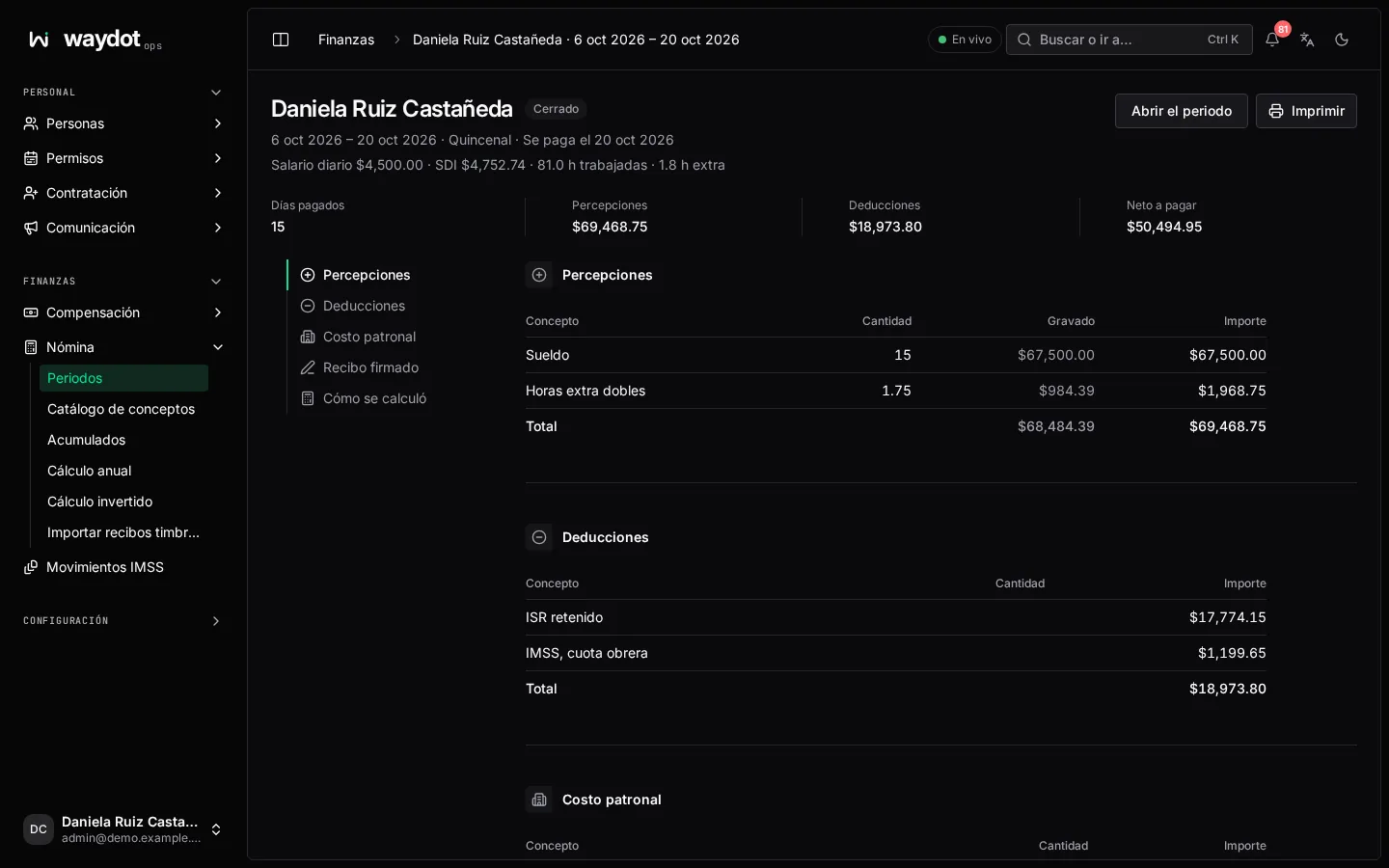
Earnings, Deductions and Employer cost, with Line, Quantity, Taxable and Amount; the daily wage and SDI, hours worked and overtime, Days paid and How it was worked out. Lines payroll works out:
| Earnings | Deductions | Employer cost |
|---|---|---|
| Wage, double and triple overtime, Sunday premium, holiday worked, vacation premium, incentive, expense reimbursement, mileage, year-end bonus, bonuses, commissions, employment subsidy | ISR, IMSS employee share, INFONAVIT credit, FONACOT credit, loan repayment, unpaid absences and leave, incapacity (paid by IMSS) | IMSS employer share, INFONAVIT 5% employer, state payroll tax |
A loan repayment is held back by the 30% limit (LFT art. 110) if it exceeds what's allowed. Signed: the person signs their payslip in the app.
Year-end bonus and off-cycle payments
Open an off-cycle payment with What it pays (Year-end bonus 2026). Add the year-end bonus works it out for everyone owed it (15 days by default, in proportion to time worked). For other payments, add what each person is paid. Then follow the same steps.
Final settlements
On offboarding, Open the final settlement with its Paid on date. Always paid: the days since the last period that paid them, the proportional year-end bonus and pending vacation with its premium; with the seniority premium (LFT art. 162) when it applies. Under Terms of the departure (Resignation or Dismissal):
| Option | What it adds |
|---|---|
| Dismissed without cause: pay severance | Three months of integrated wage (LFT art. 48, 50 III). |
| Reinstatement refused: add twenty days a year of service | LFT art. 50 II. Only with severance. |
| Note | Agreement before the conciliation centre. |
Separation ISR is worked out under LISR art. 95. If a regular period still pays them, approve it first or recalculate without that person.
PTU
PTU (profit sharing), in an off-cycle payment: 10% of the year's taxable income.
- Calculate the shares: Fiscal year and Amount to distribute (MXN).
- Half is shared By days worked and half By wage; each person's Share, with statutory caps holding back the excess (Capped).
- Not taking part: directors, administrators or general managers you exclude, and temporary workers with under 60 days. Include again if you made a mistake.
- Pay … in this period, and follow the steps like any payroll.