

English
The ticket queue
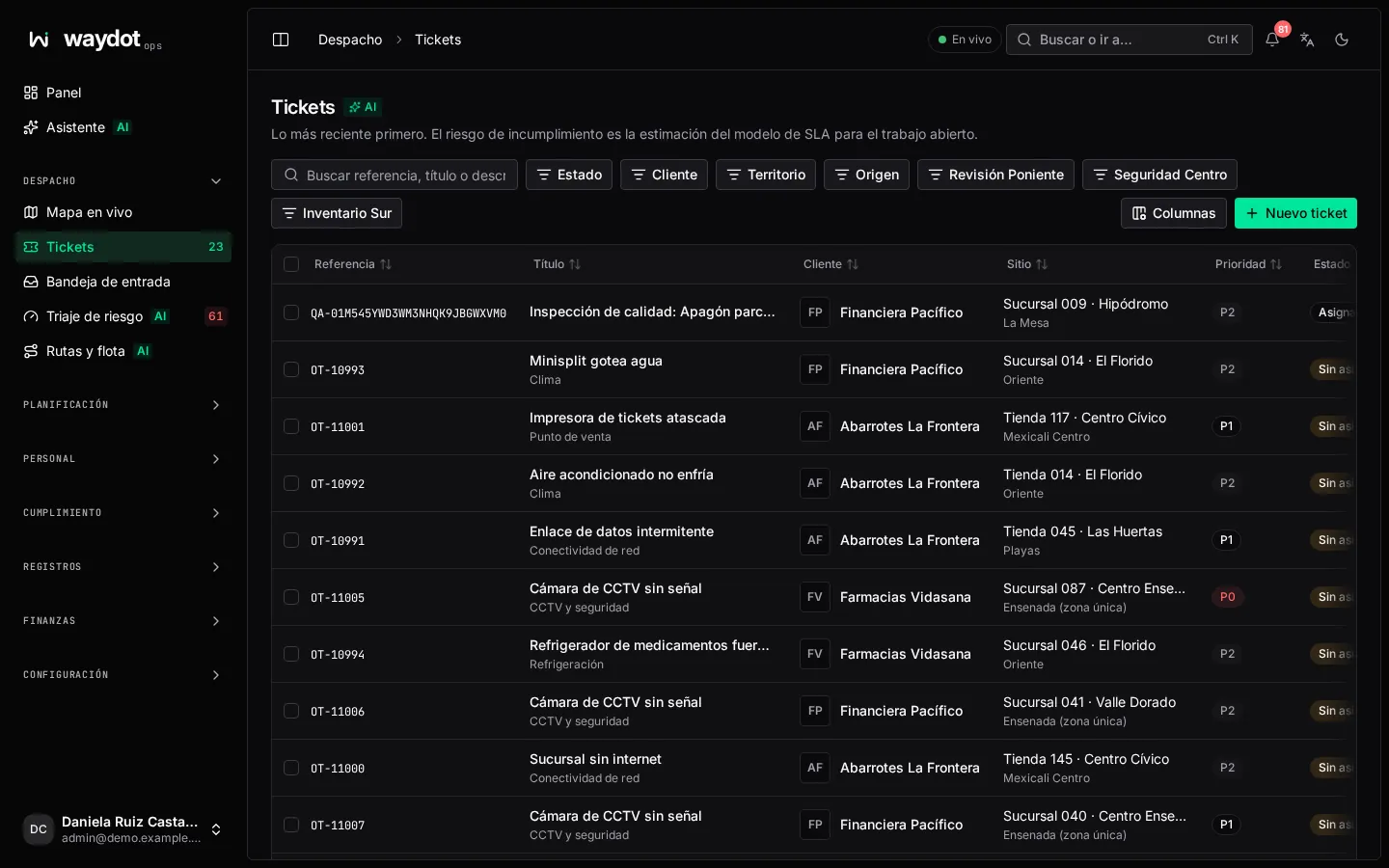
Tickets lists all the work you can see, newest first. From here each ticket opens, several are assigned at once and the queue is exported.
Where it is: Dispatch → Tickets. The number next to the menu entry counts unassigned tickets. Who sees it: people allowed to read tickets. With the plain permission you see tickets assigned to you; with read tickets in your scope, all those in your territories.
Columns
| Column | What it shows |
|---|---|
| Reference | The ticket identifier, for example OT-10993. Tickets created by a quality inspection start with QA-. |
| Title | The line summarizing the work and, underneath, its kind of work (category). |
| Client | Who the work is for. |
| Site | Where it is, and its territory underneath. |
| Priority | The level from the client's contract: P0 (most urgent) to P3, or the names that contract uses. |
| Status | Where it is in its lifecycle. See Ticket states. |
| Breach risk (AI) | The SLA model's estimate for open work: On track, Watch, At risk or Critical. Not scored when not calculated yet. |
| Owner, Deadline, Raised, Resolved | The primary agent, the resolution deadline, when it was raised and when it was closed. |
Columns (top right) chooses which columns to show. Clicking a header sorts.
Search and filters
- Search reference, title or description… searches those three fields.
- Filters (each takes several values and they combine):
| Filter | What it does |
|---|---|
| Status | Open, Assigned, Accepted, In transit, Arrived, In progress, Pending follow-up, Resolved, Cancelled. |
| Client | One or several clients. |
| Priority | Only appears when you choose exactly one client, because each contract defines its own priorities. |
| Territory | One or several of your territories. |
| Origin | Reactive (someone raised it) or Scheduled visit (a visit plan generated it). |
| Schedule | Appears when filtering scheduled visits: the plan that generated the ticket. |
| Custom fields | Each ticket custom field of selection or yes/no type becomes a filter (for example Is the client billed?). |
Filters live in the page address: you can bookmark it or send it to someone and they will see the same view. Changing a filter returns to the first page.
Acting on several tickets
Tick the boxes on the left (or the header box for the whole page). A bar appears with:
| Action | What it does | Permission |
|---|---|---|
| Assign… | Assigns all ticked tickets to the same person with the same reason. Those that can't be assigned stay as they are and are listed. | Assign tickets |
| More → Change priority | Changes the priority. Closed tickets, those already at it and those whose contract lacks that priority are skipped. | Assign tickets |
| More → Attach task list | Adds a task list to each. | Manage task templates |
| More → Cancel tickets | Cancels those that can be cancelled from their state. | Cancel tickets |
Before applying, the dialog says how many will change and which will be skipped and why. Each ticket changes separately, with its own audit entry.
Export
Export CSV downloads the queue with the current filters and search. It opens in Excel or Google Sheets.
List states
- No tickets yet: the workspace has none. Create the first ticket.
- Nothing matches the filters: clear them to see the whole queue.