

English
Integrations
An integration connects WAYDOT to another system: a mailbox or chat your clients request service through, a client's ticketing system, a system of your own that calls the API, or a receiver WAYDOT tells about every event.
Where it is: Configuration → Integrations, with the Connections, Webhooks and Delivery log tabs. Who sees it: people allowed to read integrations; connecting and changing needs manage integrations.
What can be connected
| Kind | What it does | Needs |
|---|---|---|
| Email your provider forwards (Postmark, Mailgun or any) arrives as messages in the intake inbox. | Client intake module | |
| Messages to your WhatsApp Business number arrive in the inbox and can be answered. Each extra number is an add-on. | Client intake | |
| Telegram / Slack | Messages to your bot or app arrive in the inbox and are answered in the chat or thread. | Client intake |
| ServiceNow, Jira, Zendesk, Freshdesk, Freshservice | Incidents or tickets updated in the client's system are polled and arrive in the inbox. | API tokens and webhooks; each connector is an add-on |
| SAP Plant Maintenance, Dynamics 365 Field Service | The client system's functional locations, accounts and equipment are read as sites and assets. | API tokens and webhooks; connector |
| Inbound webhook | Any system that can POST JSON sends work to its own signed address. | API tokens and webhooks |
| API access | A service account with its own tokens, for a system that calls the WAYDOT API or an AI agent on the MCP server. | API tokens and webhooks |
| Zoom, Google Meet, Microsoft Teams | Each scheduled interview gets its meeting. See Video meetings. | Video meetings |
| AI provider | Your own model key; AI uses it instead of platform credits. See Platform settings → AI. | Personal AI keys |
E-signature and payroll receipt stamping are connected from the Human resources app (E-signature, Payroll CFDI).
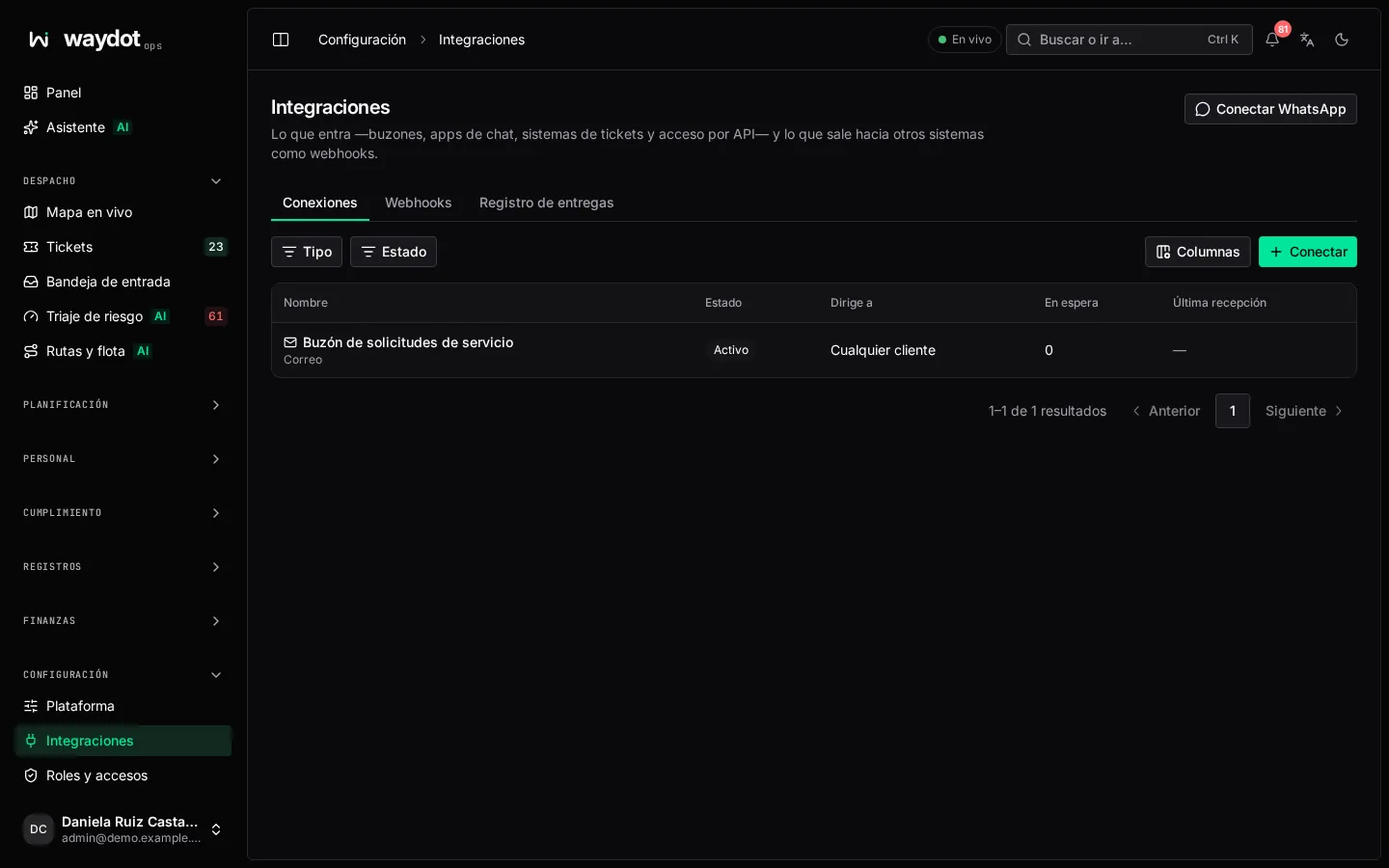
The connections list
Each connection with its kind, Routes to (the client or Any client), Last received, how many messages are Waiting and whether it's Failing. Connect adds one.
Connecting
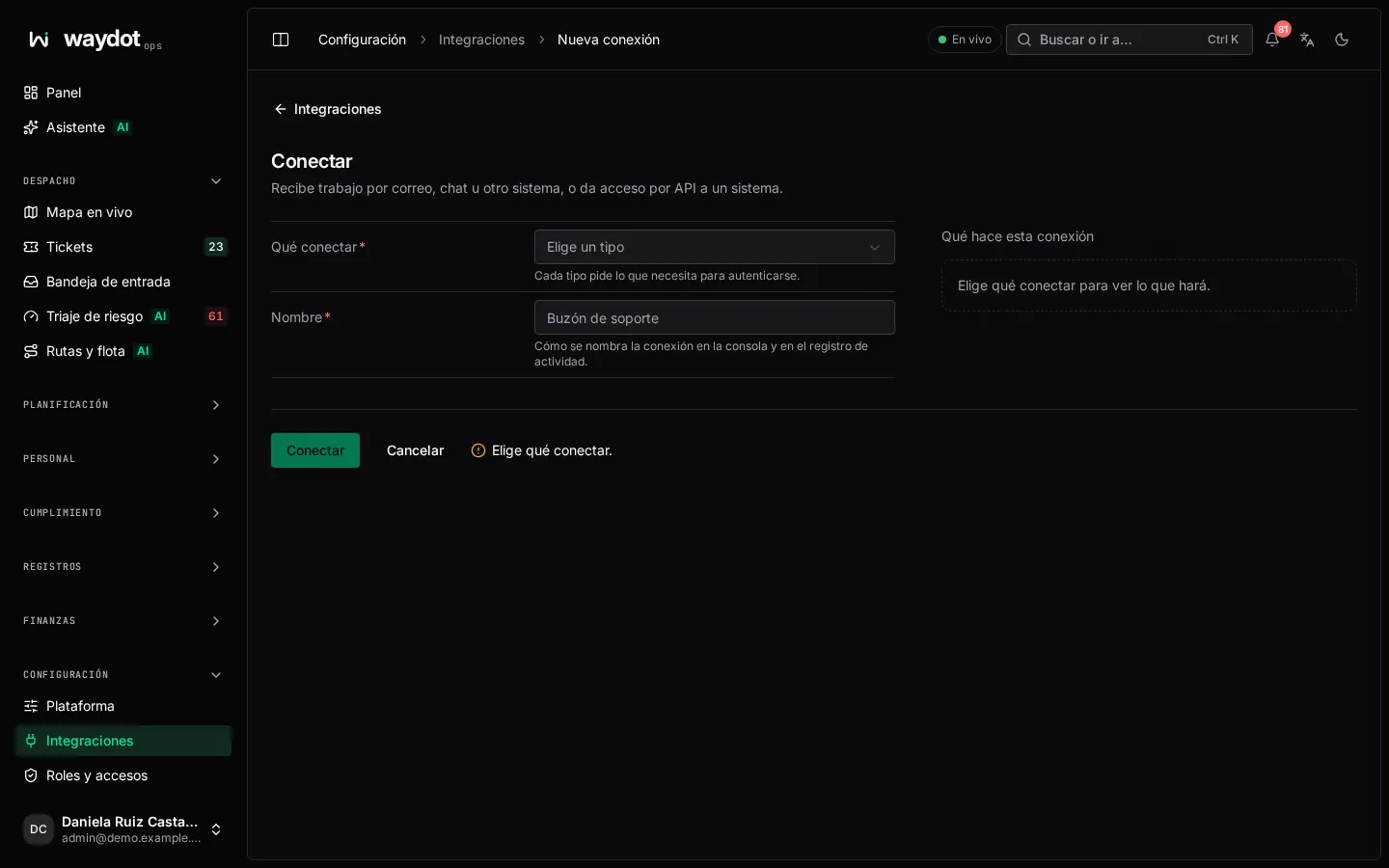
Choose What to connect: each kind asks for what it needs to authenticate. On the right, What this connection does sums it up (Polls updated incidents every minute · Messages wait in the intake inbox · for OXXO · senders get a confirmation).
Common fields
| Field | What it is |
|---|---|
| Name | How it's named in the console and in the activity log (Support mailbox). |
| Client | Messages are filed with this client. Empty (Any client): each message is placed on its own. |
| Default site | Where tickets open when the message doesn't say. |
| Open tickets by itself | A message naming its site becomes a ticket without waiting in the inbox, once its priority is known: sent by the client's system or assessed against their contract when triage is on. |
| Acknowledge senders | The sender is told their message arrived and, later, the ticket reference. |
| Credentials | By kind: signing key, access token, phone number ID, bot token, username and password, API token or key, tenant ID, client ID and secret, private key… Stored encrypted and never shown again. |
Email
Provider: the service that forwards your email; its signature is checked on every delivery. On connecting you get the Delivery address your provider must forward to.
WhatsApp
Connect WhatsApp opens Meta's sign-up to choose or create your WhatsApp Business account and number. When done: WhatsApp connected. Its progress templates were sent to Meta for review. (If it doesn't load, check nothing in the browser blocks facebook.com.)
ServiceNow, Jira, Zendesk, Freshdesk, Freshservice
| Field | What it is |
|---|---|
| Instance address | The https:// address as you open it in the browser. |
| Check every | Minutes between polls, 1 to 60. |
| Filter | Jira: a JQL filter (project = OPS). ServiceNow: an encoded query (assignment_group=…). Zendesk: search terms (tags:waydot group:Field). Empty: everything updated since the last poll. |
SAP Plant Maintenance and Dynamics 365
| Field | What it is |
|---|---|
| Instance address | SAP: the OData gateway root (https://sap.acme.mx/sap/opu/odata/sap). Dynamics: https://acme.crm.dynamics.com. |
| SAP client | Three digits (100). Empty: the gateway's. |
| Client | The client whose sites and equipment that system holds; what's read is recorded under them. |
Nothing is read until you sync from the connection's page.
API access
| Field | What it is |
|---|---|
| Acts as | The roles its tokens carry. It can do what those roles allow and nothing more. At least one. |
| Clients it may see | Empty: the whole organization. |
A service account takes no seat (Takes no seat). Tokens are issued on the next page.
Inbound webhook
A signing secret shown only once is generated, on the next page: Copy it now. It isn't shown again. Store it in the sending system.
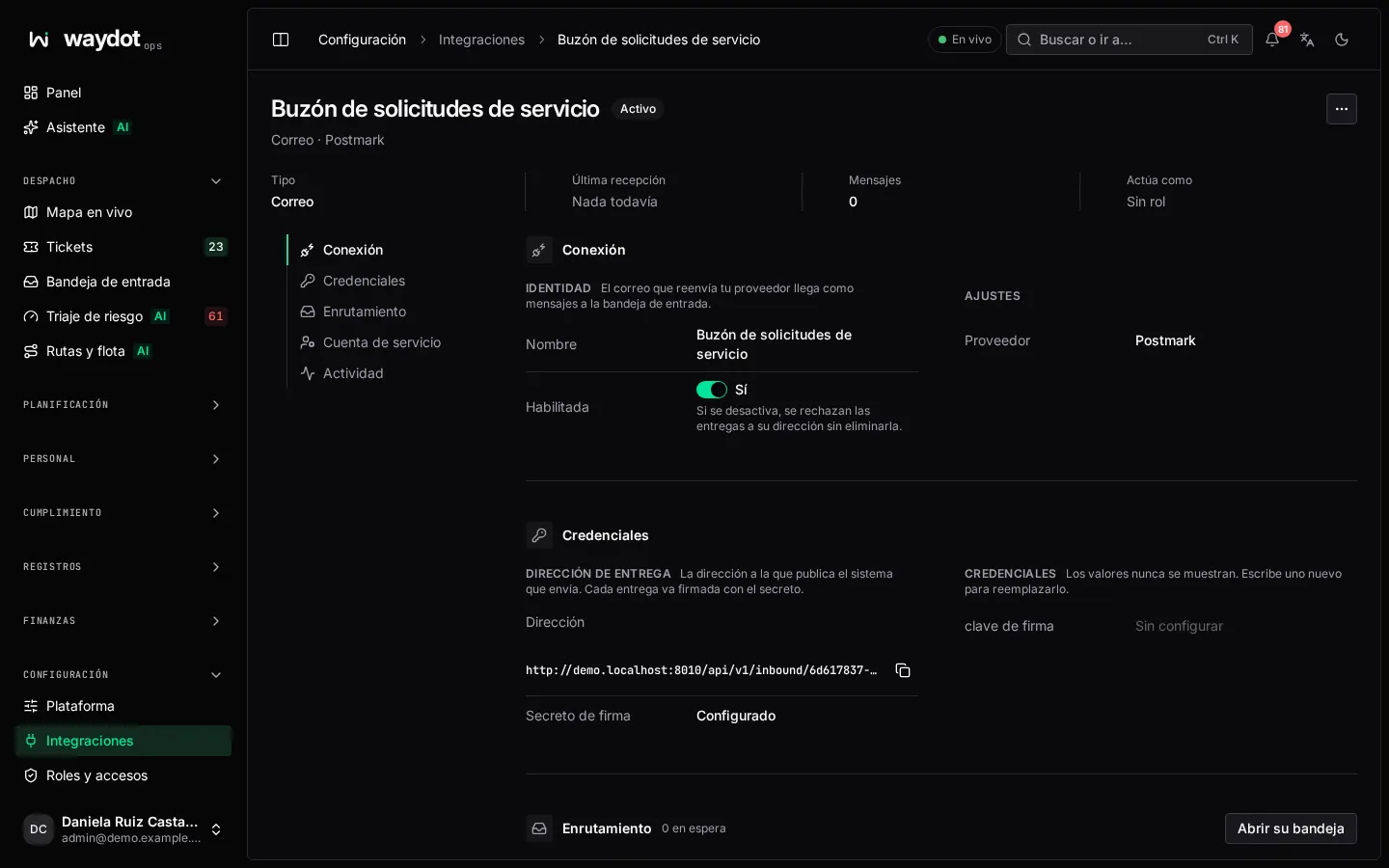
A connection's page
| Section | What it holds |
|---|---|
| Connection | Identity (name, kind, connected by), Enabled (off, it stops being used without being deleted; an inbound webhook refuses deliveries), Last received and Messages (with Open its inbox). |
| Credentials | Set / Not set. Values are never shown; type a new one to replace it. For an inbound webhook, the Address (Copy address) and the Signing secret. |
| Routing | Where it lands (client, default site) and What happens to a message (open tickets by itself, acknowledge). |
| Their priorities | For ticketing systems: how each priority of their system (1 - Critical) translates to one of the client's contract. Add priority. Unmapped, the message carries no priority and a person decides it in the inbox (or triage does). |
| Client messaging | For email and WhatsApp, see below. |
| Polling | The schedule and the Last error (No errors). |
| Sites and equipment | For SAP and Dynamics, see below. |
| Field mapping | Where each field is read from; empty uses the path shown in grey. |
| Service account | What it may do and its Tokens. |
Client messaging
Who may request service through the connection, what they're told and in what language:
| Setting | What it does |
|---|---|
| Only approved requesters | An unapproved number or address is asked who they are and waits until you or the client confirm. See Requesters. |
| WhatsApp assistant | Handles the chat: identifies the branch, asks what's missing and opens the ticket when the client taps Confirm. |
| Tell requesters how it is going | WhatsApp: assigned, on the way, arrived and done, as messages; after a day without the client writing, as approved templates. Email: assigned, done, another visit and cancelled, held 15 minutes to bundle nearby changes into one email. |
| Language | Spanish or English. |
| Reply-to address | Where replies to progress emails go; usually this mailbox. |
| WhatsApp business account | The account id at Meta, needed for templates. Submit update templates submits them for Meta review. |
| Sandbox | Never calls Meta: what would be sent stays in the log. For testing with simulated messages. |
Sites and equipment (SAP, Dynamics)
Test connection, and Sync sites / Sync equipment. Each read's outcome: Created, Updated, Unchanged, Without a matching site (equipment whose site doesn't exist), Skipped and Errors. Field mapping sets where sites' Their ID, Name, Address, Latitude and Longitude, and equipment's Their ID, Serial number and Warranty end are read from.
API tokens
Each calling system gets its own token; AI agents connect to the MCP server at the address the page shows.
- Issue a token with a Label (ERP production), to tell it apart and revoke it separately.
- Copy the token: it's shown only once.
- Each token shows when it was issued and last used. Revoke refuses its calls from now on; it can't be undone.
Actions
Under More actions: Rotate secret (deliveries signed with the current one are refused from now on; update the sending system right away), Push workflow again and Disconnect (its address stops accepting deliveries and its tokens stop working; messages already received stay in the inbox).
Outbound webhooks
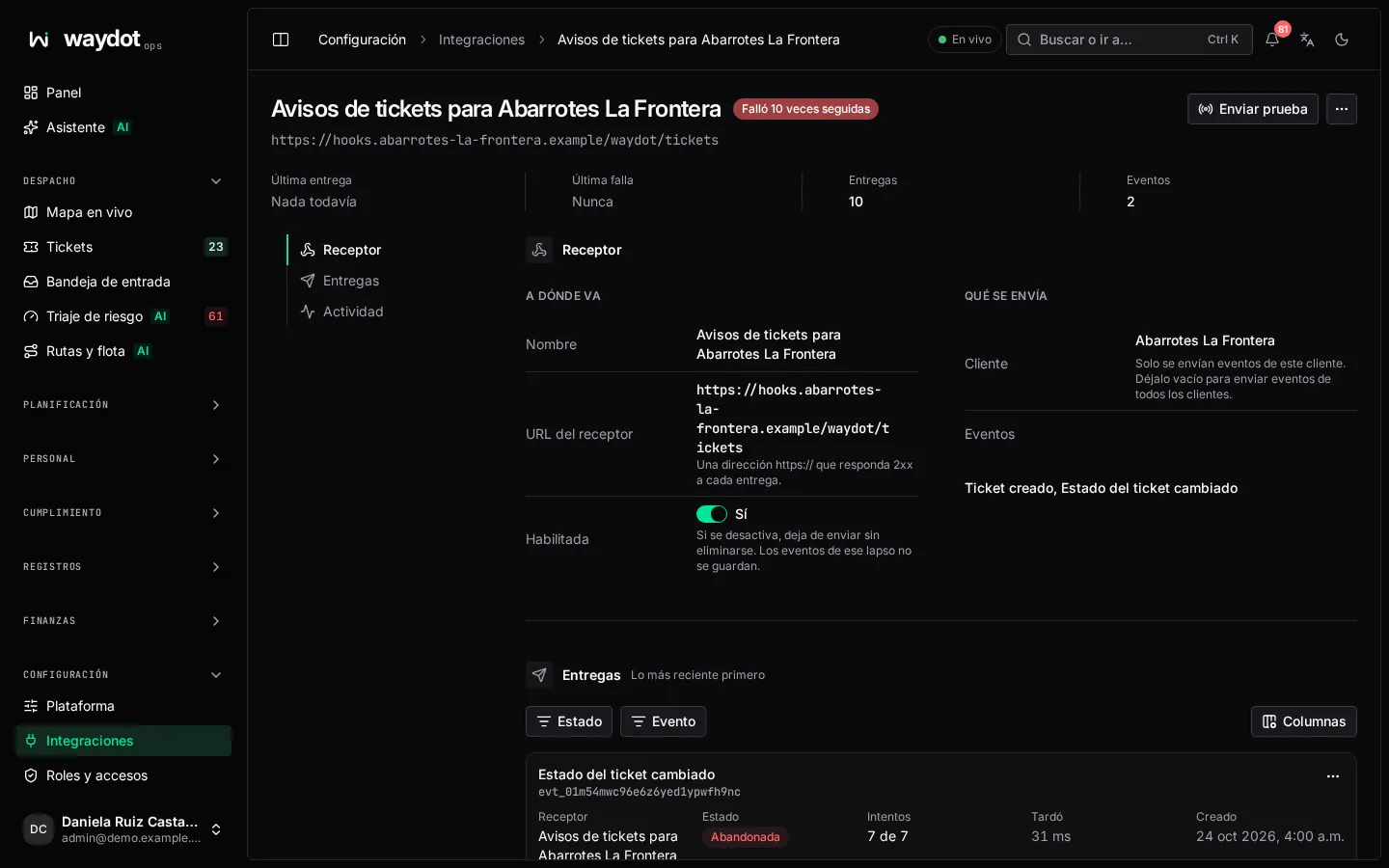
A webhook sends WAYDOT events to another system as they happen. Add webhook:
| Field | What it is |
|---|---|
| Name | How the receiver is named (ERP). |
| Receiver URL | An https:// address that answers 2xx to each delivery. |
| Client | Only this client's events. Empty: all. |
| Events | By area, one event or All events. Add event. |
Available events:
| Area | Events |
|---|---|
| Tickets | Created, assigned, summary updated, status changed, resolved, unassigned, team assigned, follow-up created, SLA threshold crossed, escalated. |
| Records | Note added. |
| Intake | Inbound message received. |
| Finance | Expense submitted. |
| Location | Geofence entered and exited, location anomaly detected. |
| Assets | State changed, low stock, damaged, warranty expiring, transfer addressed. |
| Workforce | Attendance anomaly. |
| Safety | Incident reported, hazard observed, SOS raised, corrective action overdue. |
| Fleet | Maintenance due, paper expiring. |
| Scheduled visits | Scheduled visit overdue. |
| Recruitment | Job opening published, applicant received, interview scheduled, applicant hired. |
How delivery works: each delivery is signed with a secret shown once on saving (the receiver compares the X-Waydot-Signature header with its copy). A failing delivery is retried with growing waits and then set aside as gave up for replay.
On the webhook's page: Enabled (off, it stops sending; events in that window aren't kept), Send test (a ping), Rotate secret (the previous one is still accepted for a while so the receiver can switch) and Delete (its delivery log is deleted with it).
Delivery log
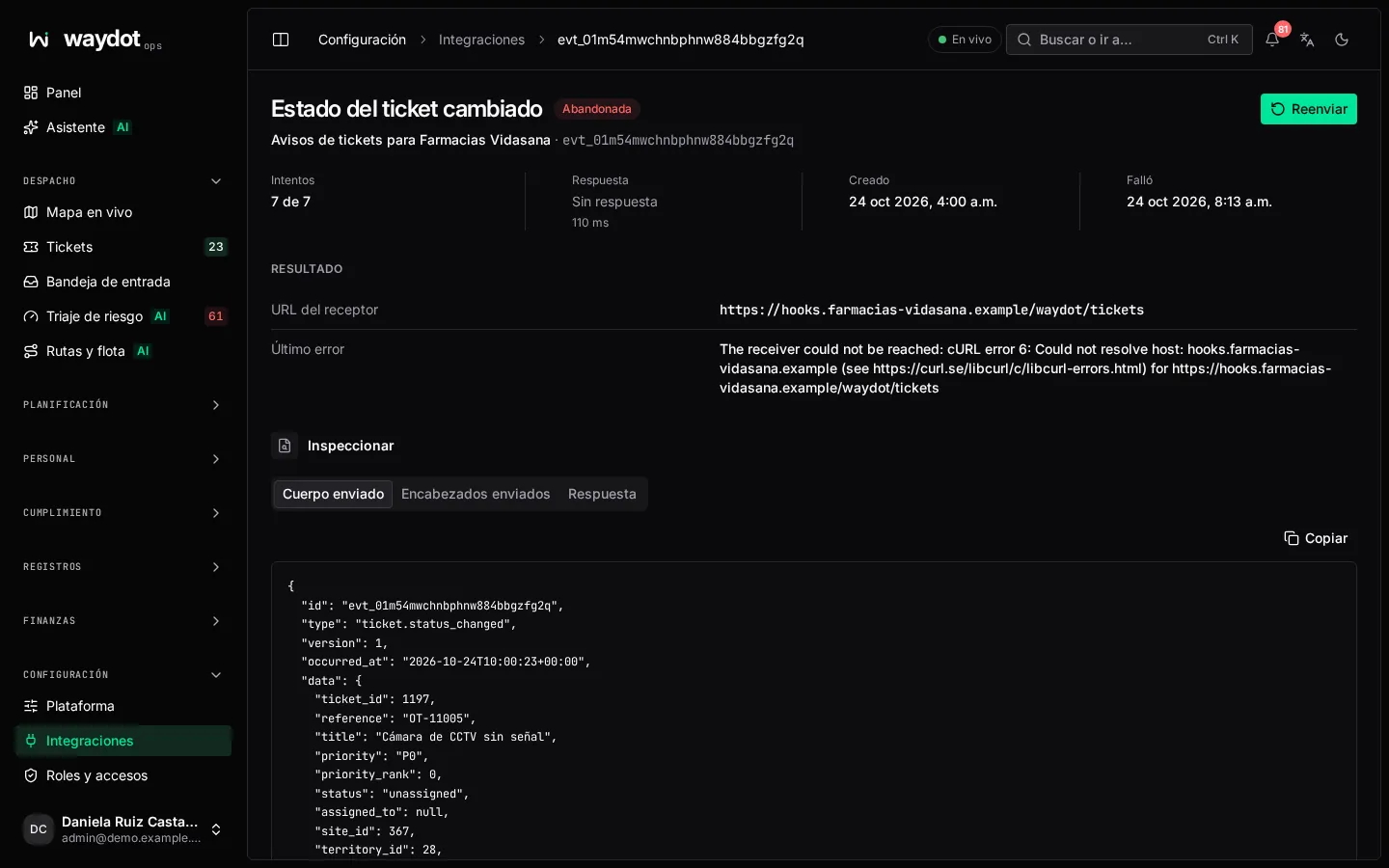
Every event sent to a webhook, with Event, Receiver, Attempts (2 of 8), Answer and state: Sending, Delivered, Retrying or Gave up.
Inspect shows the last attempt's Headers sent, the Body sent, the receiver's Response, how long it Took and the Last error. Send again sends it again.