

English
AI assistant in the field
The field assistant helps you diagnose what's in front of you: it checks the store's history, applies the runbooks, looks at the photos you send and records on the ticket when you're done.
Where it is: Asistente in the bottom bar, or Consultar al asistente from a ticket (Con acceso al ticket — with access to the ticket). Plan: AI field assistant module. Needs a connection; your company decides which AI providers are allowed and whether each person may use their own key.
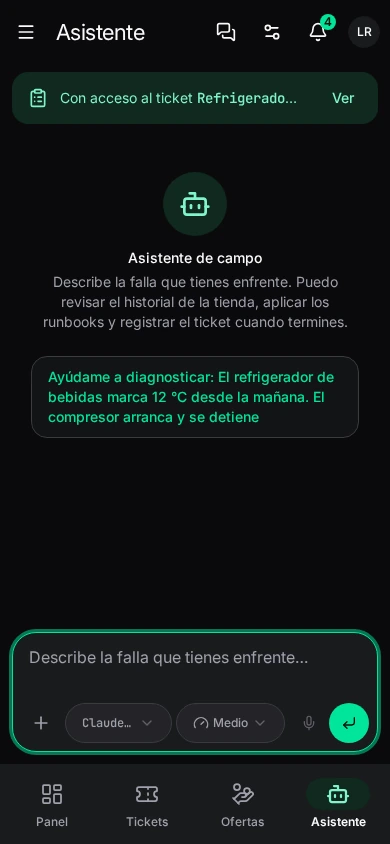
Talking to it
Describe the fault: ¿Qué reviso primero en una terminal POS que no enciende? (what do I check first on a POS terminal that won't turn on?), La impresora térmica imprime en blanco…, No hay red en la sucursal… From a ticket it suggests Ayúdame a diagnosticar: [the fault].
- Adjuntar a Foto del equipo (PNG, JPG or WebP); you can also drag or paste it.
- Runbooks: choose which to consult. With none chosen, the assistant picks by the fault.
- Herramientas (tools) it can use: Consultar base local (local data), Gestionar tickets, Gestionar runbooks, Estilos y temas, Galería de fotos and Directorio de sucursales.
Writes always ask for your approval before saving: if the assistant wants to record something on a ticket, it shows you what and you confirm.
On each answer: Copiar respuesta, Regenerar respuesta, and on your messages Editar la pregunta (later answers are discarded). Answers cite their sources.
Conversaciones: your previous chats (search, archive, delete). If AI fails it says why: Sesión vencida (session expired), No permitido por tu organización (not allowed), No incluido en tu plan, Créditos agotados (credits used up), No se pudo conectar.
AI settings
Ajustes → Asistente → IA: choose who answers and with what credentials.
- Disponibilidad: whether AI answers, with what permissions and on what: Clave de tu organización (your organization's key, · Anthropic) or Créditos de tu organización (1,240 de 5,000 este mes).
- Política de tu organización: allowed providers and whether personal keys are allowed.
- Mis claves (my keys): if your organization allows it, use your own provider account (Proveedor and API Key). The key is stored encrypted on the server, for you only, never on the phone; your requests use it without spending the company's credits.
- Almacenamiento: repeated answers are reused to save data and credits; Vaciar caché de respuestas clears them.
Skills (runbooks)
Ajustes → Asistente → Habilidades: capabilities AI acquires — instructions, rules, procedures and documentation indexed on the device. They come from your company's catalog (Knowledge base) and are indexed on the phone to use offline.
- Each skill: Activa, Del catálogo (from the catalog) or Modificada, its Categoría. Activar, Desactivar, Reindexar, Desinstalar.
- Buscar actualizaciones syncs with the catalog.
- Nueva habilidad: Nombre, Dominio, Descripción (what's compared with the reported fault), Palabras clave (literal match, accents ignored), Frases de ejemplo (searched by meaning), the Definición (instructions and rules) and Prioridad (breaks ties). Ajustes de búsqueda: chunks per query and similarity threshold. Guardar e indexar.
Writing styles
Ajustes → Asistente → Estilos: how AI rewrites the technician's resolution before sharing it. Your company's styles (see Writing styles), with the Predeterminado (default). You can Duplicar one and adjust it (name, instructions and template), or go back to the official catalog.
When resolving a ticket, the resolution summary can be rewritten in a style; you review the result before saving.