

English
The ticket
A ticket's page gathers everything known about the job and is where it is moved forward, reassigned, resolved or cancelled.
Where it is: click any ticket (queue, Dashboard, map, search). Who sees it: whoever can read the ticket. Each section appears only if your role can read its data and your plan includes its module.
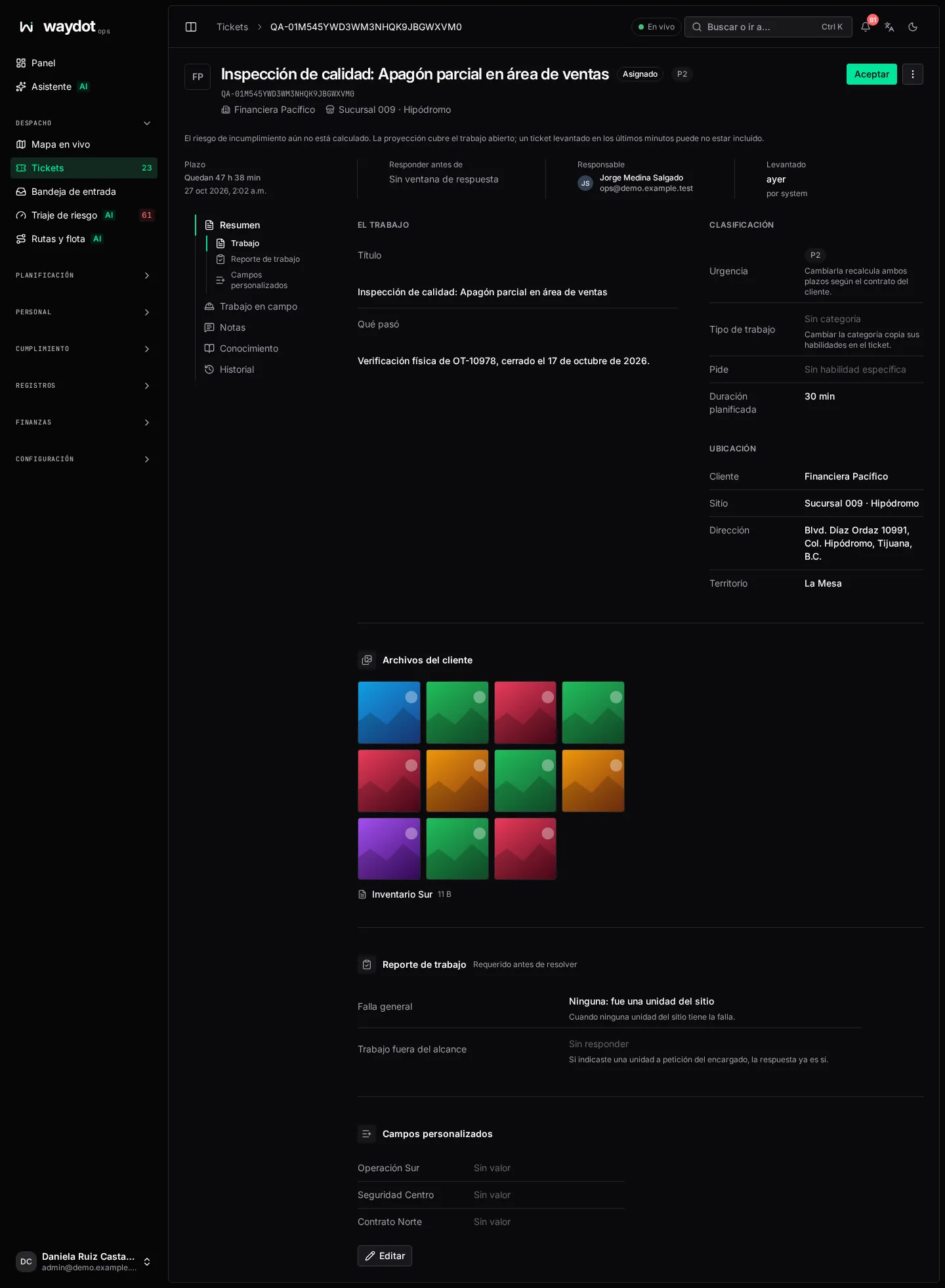
The header
| Element | What it is |
|---|---|
| Title, status and priority | For example Receipt printer jammed · Assigned · P1. |
| Reference, client and site | Links to the client's and site's records. If it came from a visit plan, also the link to the visit. |
| Primary action button | The next lifecycle step: Accept, Start travel, Mark arrived, Start work or Resolve…. Hovering explains its effect. Other possible steps are in the ⋯ menu. The agent normally moves the ticket from their phone; the console allows it to correct things or when the agent doesn't have the app. |
| ⋯ More ticket actions | Copy reference, Copy ticket ID, Reassign, Return to queue…, Raise a follow-up visit, Cancel ticket…. |
Underneath, four facts:
| Fact | Meaning |
|---|---|
| Deadline | How long is left to resolve it (48 h 10 min left) and the due date. Red when overdue. |
| Respond by | The deadline to arrive on site. No response window if the contract has none for that priority. |
| Owner | The primary agent; + N on the team if there are supporting agents. |
| Raised | How long ago and by whom (a person, a system or a visit plan). |
If the SLA model scored it, a callout shows the Breach risk (Critical, At risk…), the chance of missing the deadline, the Expected done, what it Needs and Why, with See recommended agents. If not calculated yet: Breach risk is not scored yet.
Sections
The index on the left groups the sections under Overview, Field work, Notes, Knowledge and History.
The job
| Field | Meaning | Editable |
|---|---|---|
| Title and What happened | What was reported. | Yes, with permission to assign tickets. |
| How it was resolved | The resolution notes, once resolved. | — |
| Urgency | The contract priority. Changing it recalculates both deadlines from the client's contract. | Yes. |
| Why this priority | Where the priority came from: a person chose it, the requester stated it, it came from the client's system, AI triage assessed it against the contract criteria, or it is internal (for example quality inspections). If it was assessed with low confidence, it says Assessed with N% confidence and asks you to Confirm or choose another level. | Confirm or change the urgency. |
| Kind of work | The category. Changing it copies its skills onto the ticket. | Yes. |
| Asks for | The skills the job needs. | Through the category. |
| Planned duration | How long it is expected to take on site. | — |
| Client, Site, Address, Territory | Where it is. | — |
Files from the client: photos and documents that came with the request (for example attachments from an email or WhatsApp).
Work report
Required before resolving.
| Field | Meaning |
|---|---|
| General fault | The cause when no unit on site has the fault: None: it was a unit on site, Carrier link or internet, Mains power, A central system or Something else. |
| What was upstream | Required when the cause is Something else. |
| Work outside the scope | Yes or No: whether anything was done beyond what the ticket asked. If a unit was named Asked for on site, it is already Yes. |
| Work outside the scope (detail) | What extra was done. |
Custom fields
The fields your workspace defined for tickets, with Edit. See Custom fields.
Cost
With the job costing module and permission to read costs, once the job closes (together with its follow-ups) Cost appears: labor, travel, parts, expenses and overhead. The job is costed once it and its follow-ups are closed. See Cost per ticket.
Required work
The attached task lists and their progress (3 of 5 required answered).
- Attach a checklist adds a task list to the visit; its required answers become a condition for resolving.
- Answers save as they are given and can open follow-up questions according to the form's logic.
- Detach removes a list, but a list with recorded answers can't be detached.
- Some required answers are missing. The ticket cannot be resolved until they are in.
Ticket team
Who works on the ticket: the primary agent and supporting agents, with their status (arrived, left, signed off).
- Staff this ticket / Edit team adds or removes supporting agents. The primary is changed by reassigning. The maximum supporting agents per ticket is configurable in Platform settings.
- Each supporting agent must sign off their part (Sign off my work, with My sign-off notes); observers don't hold up closing. The primary signs off by resolving.
- N / M sign-offs recorded.
- Co-presence: if team members arrived close together, the team's co-presence is recorded.
- Record my arrival / Record my departure from the console is marked not GPS-verified.
Evidence
The photos this job must prove according to the quality rules, with their time and location.
- Requirements: each requested photo, Required, and whether it is Complete or Pending.
- Recorded captures: the uploaded photos and videos, by whom. Opening one shows the original capture and its metadata.
- Add evidence / Upload inspection evidence from the console.
- Quality rules applied (N) and the Audit sampling rate.
Safety
The safety checklists (job safety analysis) that apply to this ticket.
- Cleared: the required checks are done.
- Not cleared: a required checklist is missing or has blocking findings. The ticket can't be resolved until it is cleared.
- Answer checklist from the console, View answers and Fix a submission (the original answers remain; a reason is asked).
See Safety checklists.
Equipment
The units (assets) the job is about.
- Name a unit: search by asset number or serial, or pick from the Units installed at this ticket's site. Naming a unit doesn't move it: custody only changes through a transfer.
- Scope: What the ticket was raised for or Asked for on site (out-of-scope work).
- Symptom: what's wrong with it.
- Record work: How it ended (Repaired, Replaced, Not fixed, Withdrawn, Not found) and Work done. Each unit needs both before resolving.
- Units To remove: listed by a refresh plan to be collected on this visit.
- Named on N more tickets warns that the unit fails often.
Notes
A conversation about the ticket. Anyone who can open the ticket can read them; notification rules decide who is told. Type and choose Add note (Ctrl + Enter).
Knowledge
With the knowledge base: Matching guides for this job and the site's equipment, and Resolved jobs like this one (Same client, Fixed by:). From here a field note with what was learned can be proposed. See Knowledge base.
Follow-up visits
Linked visits shows the chain: Previous visit, Next visit, Visit N of this service chain and why it was raised.
Raise a follow-up visit (⋯ menu) creates another ticket that inherits the site, diagnosis and skills:
| Field | What it is |
|---|---|
| Reason | Why another visit is needed (a missing part, the client wasn't there…). |
| Title | Empty uses the current ticket's title. |
| Requested part | Part description, Quantity, SKU (optional). Add several. |
After a number of visits in the same chain, the next one needs approval from someone who can dispatch (configurable in Platform settings).
Escalations
With escalation chains: each level that fired, when (N minutes after creation), who it notified, whether it reassigned and when it stopped. If nothing has happened it says the SLA chain hasn't fired on this ticket. See Escalation chains.
Activity
The timeline of everything that happened, newest first: created, updates, assignments, arrival, resolution. What changed shows the old and new value.
Resolving
Resolve… asks for Resolution notes: a summary of what was done. They go to the client report and the audit log.
Before resolving, the job's account must be complete. If something is missing, the dialog lists it under The job’s account is not complete yet::
- required answers on task lists,
- safety cleared,
- each named unit with its outcome and work,
- the work report,
- supporting agents' sign-offs.
Resolving stops the SLA clock. Keep open cancels.
Cancelling
Cancel ticket… withdraws the work and stops the SLA clock. The ticket stays in the record and is found by filtering Cancelled. It needs permission to cancel open tickets. Keep ticket cancels the action.
Returning to the queue
Return to queue… removes the current agent so the ticket can be dispatched again (the agent is taken off this ticket and it waits for a new dispatch).
If someone else changed it
If another person saved the ticket while you were editing, This ticket changed while you were editing appears and the latest version loads. Review it before trying again; your change isn't applied over theirs.