

English
Inventory in the app
Where it is: Inventario. What you carry in the van, and what's on its way.Plan: Inventory and assets module.
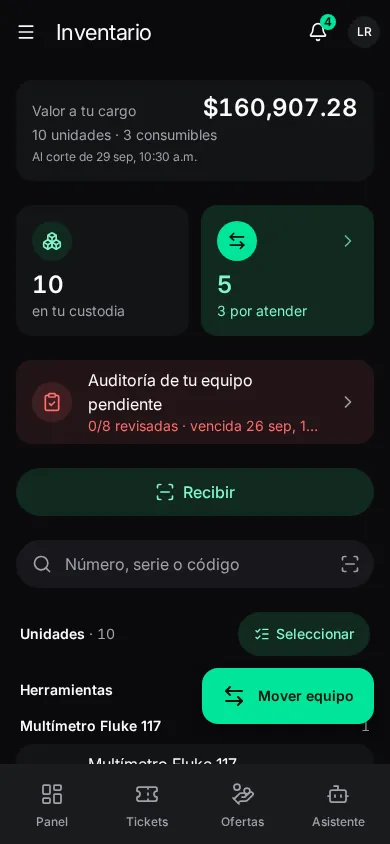
At the top: Valor a tu cargo (value in your custody), how many units en tu custodia and movimientos abiertos (open moves). The Unidades list (search by number, serial or code, filter by state) and Consumibles. Escanear una unidad finds it by its tag. Tap a unit to see where it has been.
With an audit pending, Auditoría de tu equipo pendiente appears at the top.
Moving equipment
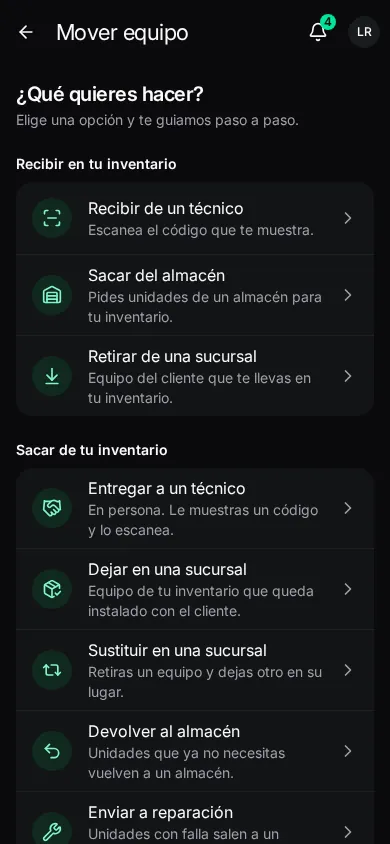
Tap the units you want to move and Mover, or Mover equipo → ¿Qué quieres hacer? (what do you want to do?):
| Into your inventory | Out of your inventory |
|---|---|
| Recibir de un técnico (receive from a technician): in person, you scan the code they show. | Entregar a un técnico (hand to a technician): in person; you show a code and they scan it. |
| Sacar del almacén (take from a warehouse): you request units from a warehouse. | Dejar en una sucursal (leave at a site): equipment from your inventory installed with the client. |
| Retirar de una sucursal (remove from a site): client equipment you take with you. | Devolver al almacén (return to warehouse): units you no longer need. |
| Sustituir en una sucursal (replace at a site): you remove one unit and leave another in its place. | |
| Enviar a reparación (send for repair): faulty units go to a repairer. |
It guides you step by step: the place, the units and the review. If a unit leaves because of a fault, write ¿Qué falla tiene?: it's recorded as warranty. You can add a note (urgency, which equipment it's for, how it's packed). From a ticket, the move carries its folio.
A move is sent online. Dispatch approves it and custody changes when it's confirmed at the place, with your position as proof. See Asset transfers.
Handing over to another technician in person
- Entregar a un técnico, pick the units. The app shows a QR code. You must both be close.
- Your colleague scans it from Inventario → Recibir. Esperando a que lo acepte…
- Once accepted, the units leave your inventory with the next sync. Retirar oferta if you change your mind.
Recibir (receive)
Recibir: from a technician in person, or an approved shipment.
- De un técnico: scan the code they show on their phone; Aceptar or Rechazar (with the reason: Falta una unidad, no es lo acordado…).
- Envíos por confirmar (shipments to confirm): confirm when you have the units with you → Confirmar recepción.
Movimientos: the transfers you take part in, with their state and history.
Consumibles (consumables)
Batches of material in your custody (tape, connectors…) with Lote (batch), Caducidad (expiry), Valor restante and Costo por unidad. They're deducted by themselves, one per ticket, on resolving. Registrar uso only for what you use outside that (Usos and Nota).
Auditorías (audits)
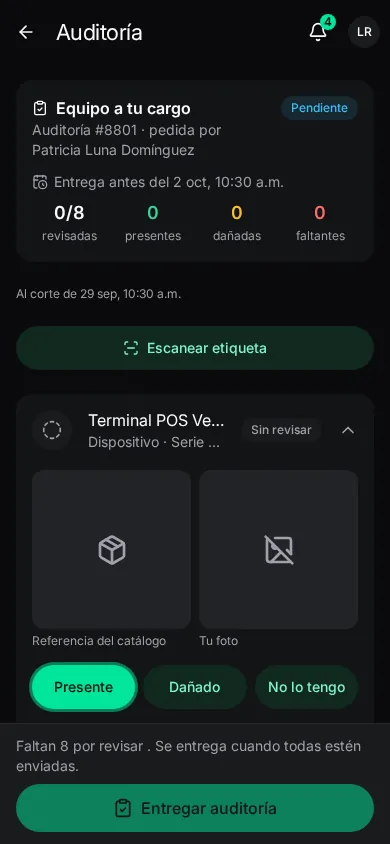
Mis auditorías: checks of your equipment and your vehicle. Open one:
- For each line (or scan its code), mark the Resultado (result): present, damaged or missing. For damage, ¿Qué daño tiene?; for missing, ¿Qué pasó con él?
- Tomar foto con la cámara: the photo is stamped with date, time and your location; only accepted from the camera, taken now. The catalog reference image is shown beside it.
- For consumables, Cuenta los usos (count the uses left); for a vehicle, the Odómetro.
- Guardar respuesta. Works offline if you opened it once online.
- When every line is sent: Entregar auditoría (submit; needs a connection).
A line refused in review comes back for correction. The exit audit (when leaving the company) is read-only; HR or Inventory reviews it when receiving what you hand in. See Custody audits.