

English
Field app
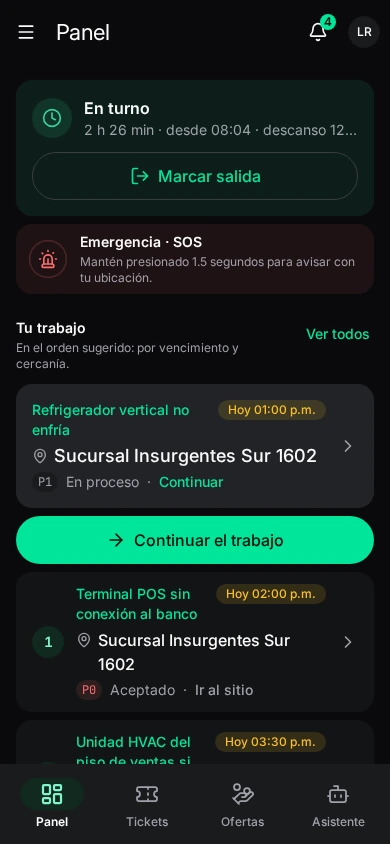
The field app is what technicians and agents use out on the street: they get offers and tickets, clock in, navigate to the site, do the work step by step with evidence, move equipment, log expenses and fill-ups, call for help with SOS and check their payslip.
Where it is: for Android. Download it from waydot.mx/download (the link also appears when inviting a person). Sign in with the same account as the console. Who uses it: usually the Field agent role; a dispatcher can also sign in and sees the tickets in their scope.
The app is in Spanish
The field app's interface is Spanish only. In these pages each label appears as it reads in the app, followed by its meaning in English.
The menu
In the bottom bar: Panel (dashboard), Tickets, Ofertas (offers) and Asistente (assistant). The side menu groups everything:
| Group | Screens |
|---|---|
| Trabajo (Work) | Panel, Tickets, Ofertas, Asistente, Turno (shift), Seguimiento (follow-up) |
| En sitio (On site) | Ubicaciones (locations), Inventario, Vehículo, Seguridad (safety), Galería |
| Tú (You) | Gastos (expenses), Pagos (pay), Empresa (company), Desempeño (performance) |
| Ajustes (Settings) | Your account, security, notifications, employee file and system |
Some screens only appear if your plan includes the module (Inventory, Vehicle, Expenses, Pay, Company, Assistant).
Phone permissions
The app needs two permissions. If they're missing it warns at the top with Abrir ajustes (open settings):
- Location: without it you can't clock in or out, attach evidence with location, or have your arrival detected.
- Notifications: without them you don't get offers or new-ticket alerts, and offers expire in minutes.
It also asks for the camera when taking photos and scanning codes.
Offline
The app keeps working without signal: your tickets, sites, inventory and manuals are on the phone. What you do (advancing a ticket, photos, answers, notes) is queued and sent as soon as there's signal. Screens that only work online say so (Sin conexión. Las ofertas sólo se ven y responden en línea — offline, offers can only be seen and answered online). Settings → Sistema shows what's left to send.
If the server doesn't accept a change (for example someone else changed the ticket), the ticket shows Requiere decisión (needs a decision): what you see is what the server has, and you decide what to do with what wasn't sent.
The phone's security check
Each phone goes through an integrity check (root, emulator, mocked location, modified app). Depending on your company's policy, if it fails:
| Notice | What happens |
|---|---|
| Tu teléfono no pasó la revisión de seguridad | You can keep working. Dispatch already knows. |
| Solo lectura en este teléfono (read-only) | It can't save changes. Turn off mocked location or use another phone. |
| Este teléfono está bloqueado (blocked) | You can still call for help with SOS; to work, use another phone. |
See Field devices.