

English
Safety in the app
Where it is: the Emergencia · SOS button on the dashboard, and Seguridad in the menu (the alarm, and hazard reporting).
SOS
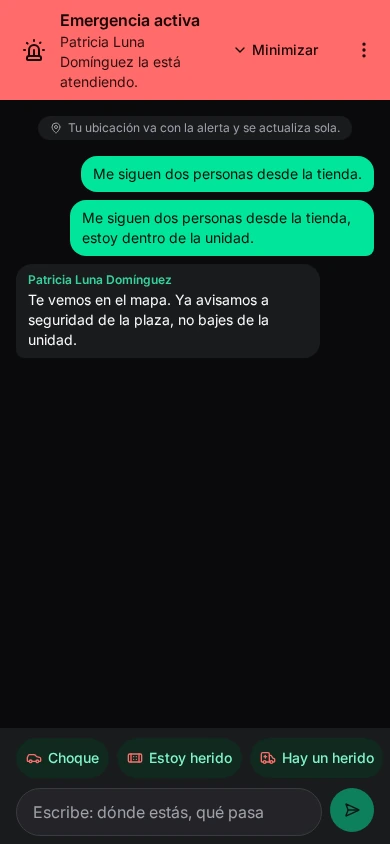
Someone hurt, a crash, a fire? It's an emergency: use SOS.
- Press and hold the Emergencia · SOS button (a tap isn't enough, to avoid accidental alerts).
- The alert goes out with your location, which updates by itself. Enviando… sale de este teléfono aunque cierres la app (it leaves the phone even if you close the app). Without signal it goes as soon as there is some: keep the phone on.
- Coordinación la recibió. Esperando a que alguien la tome (dispatch received it, waiting for someone to take it). You'll see who's handling it.
- Conversación con coordinación: tell them what's happening with the quick buttons or by typing (where you are, what's happening).
- Minimizar goes back to the app; the alert stays active (Alerta activa — tap to see who's handling it).
Cancelar la alerta: fue un error tells dispatch it was a false alarm.
It works even if your phone is blocked by the security check. What dispatch sees: SOS alerts.
Reportar un riesgo (report a hazard)
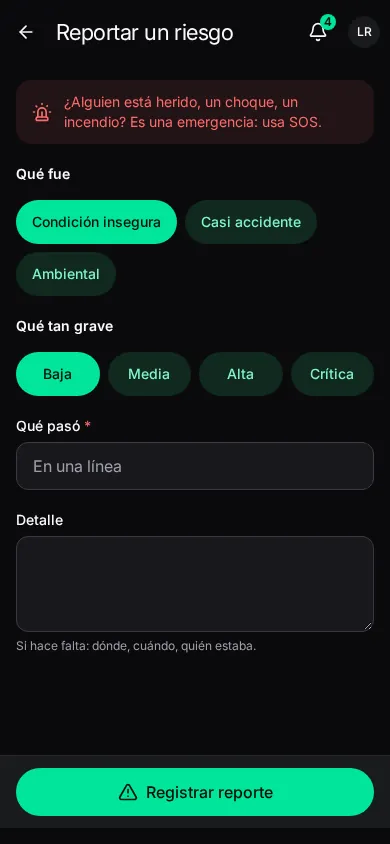
An unsafe condition, a near miss or an environmental hazard.
| Field | What it is |
|---|---|
| Tipo | What it was. |
| Gravedad | How serious. |
| Qué pasó | In one line. |
| Detalle | If needed: where, when, who was there. |
Registrar reporte. Also from a ticket: Más acciones → Reporte de seguridad. Follow its review in Seguimiento → Mis reportes de seguridad. See Hazards and incidents.
The pre-work safety checklist is answered inside each ticket: see Working a ticket → Seguridad.